
An old Bitcoin backup is rarely just an old file. It is a record of decisions made by another wallet: how it derived addresses, where it put change, which script it used, and what it encrypted. Recovering the private key is only part of the job. The receiving wallet also has to understand what that key was meant to do.
Aperture 3.5.4 puts much of its work into that less visible side of self-custody. It expands Bitcoin recovery, carries imported wallet collections through backup and migration, and adds a precise recovery route for individual Silent Payment outputs. Sending gets clearer coin selection and better checks that the wallet can actually pay the network fee. Notifications and everyday navigation receive attention, too.
This guide explains the changes across the 3.5.4 release, including build 55. The four screenshots are direct captures from build 55 in an iPhone simulator, using an empty demonstration wallet. They show the real interface; no recovery phrase or private key appears in them.
Availability note, September 13, 2026: this article covers 3.5.4 build 55. The public US App Store listing showed 3.5.3 when checked for publication. Check the App Store listing and your installed version before following a new workflow.
What deserves your attention
Recovering older Bitcoin wallets: more private-key formats, supported Bitcoin Core and Electrum files, and BRD address families.
Keeping a recovery complete: imported collections retain their keys, address policies, and derivation information through supported backup and transfer paths.
Recovering a Silent Payment output: export the full raw Taproot descriptor for an eligible unspent output, then import it without changing its meaning.
Choosing what to spend: Coin Control has its own place in Send, with address-type labels and a preview of automatic input selection.
Paying the network fee: Review checks native-coin funding, offers the relevant deposit address, and can reduce a native-coin send amount to leave room for fees.
Using the app day to day: clearer notifications, network and memo guidance, improved Solana loading and Sui transfers, and compatibility and layout fixes.
Bitcoin recovery starts with the right interpretation
Two wallets can hold the same private key and still display different addresses. Address construction matters. So do the derivation path and whether the original wallet was using a receiving branch or a change branch.
That is why importing a complete wallet file can be more useful than extracting a single key from it. A file may preserve information that a bare key does not: the script type, a saved account node, address ranges, or the point at which the old wallet should resume generating addresses.
In 3.5.4, Aperture’s Bitcoin importer accepts a broader set of representations and keeps supported wallet structure with the keys. It validates the collection before creating the wallet. A damaged or unsupported entry should stop the import, rather than quietly leave you with a wallet containing only the first usable key.
A wider set of private-key formats
The Bitcoin private-key flow supports WIF, 32-byte HEX, BIP38 encrypted keys, checksummed mini private keys, and supported extended private keys such as xprv, yprv, and zprv. It also understands Electrum’s script-prefixed WIF representations and supported private output descriptors.
BIP38 is useful when an older backup contains an encrypted private key rather than a recovery phrase. Aperture asks for its password using a secure native prompt. After successful decryption, the existing validation and import continue without requiring a second tap on Import. The password is the one protecting that encrypted key; it is not automatically your Aperture app passcode or an optional BIP-39 passphrase. The format is defined in the BIP38 specification.
Descriptors carry instructions alongside key material. Supported policies include pkh for Legacy, wpkh for Native SegWit, sh(wpkh) for Nested SegWit, and supported key-path Taproot forms. Keeping an explicit policy prevents a valid key from being interpreted as an unrelated address type. Bitcoin Core’s descriptor documentation explains the distinction between the key and the script that uses it.
For a whole wallet, prefer its supported complete export over an isolated extended key. Pasting an extended key into a single-key entry is not a promise to recover every branch and address in the original wallet. File and ranged-descriptor imports have the additional structure needed to describe a collection.
Bitcoin Core files
Aperture can read supported Bitcoin Core text exports and standalone wallet backups. These include legacy Berkeley DB v9 wallet.dat backups and SQLite descriptor-wallet backups, including the supported encrypted forms. Compatibility was verified during implementation with Bitcoin Core 28.3 outputs.
Use a complete backup produced by the original wallet. A database copied while it is in use may depend on separate journal files, and a file named wallet.dat is not automatically a complete or supported backup. Aperture does not search arbitrary damaged binary data for anything that resembles a private key.
For structured exports, the importer also accepts TXT, supported CSV layouts, and supported JSON representations, including Bitcoin Core private-descriptor exports. A CSV needs a recognized key column; merely renaming an arbitrary file to .csv or .json does not convert it.
Electrum files
Support includes standard single-signature Electrum wallet files, imported-key wallets, old Electrum derivation, supported encrypted keystores, and BIE1 whole-file encryption. The importer preserves the saved node, script type, receive and change branches, and supported ranges and gap settings.
That last detail can make the difference between recovering the right wallet and deriving an entirely different set of addresses. A saved account node is already at a particular place in the tree. Its recorded origin must not be applied a second time.
There are deliberate limits. This importer does not restore Electrum multisignature or TrustedCoin two-factor workflows, watch-only or hardware-only wallets, BIE2 hardware-encrypted files, Lightning channels, or unsplit multi-account backups. It also rejects unsupported script policies, damaged files, and unrecognized future formats. General files are limited to 64 MiB; historical Python-literal Electrum files have a lower 16 MiB limit.
Across these file imports, unsupported policies include multisignature, P2WSH, miniscript, and Taproot script trees. A supported file container does not make every spending policy inside it supported.
These are Bitcoin mainnet recovery paths. They are not universal compatibility with every wallet that has ever stored Bitcoin keys. Keep the original backup and the software information needed to interpret it until you have checked the recovered wallet.
How to import a supported Bitcoin backup
In an existing Aperture installation, start with the add-wallet control on Home.
Choose Import an Existing Wallet.
Select Private Key, then choose Bitcoin.
For a supported key or descriptor, enter it, paste it, or scan its QR code. For a wallet file, tap Import a File and select the backup in Apple’s Files picker.
Check the selected attachment. The file view shows its name and size when available; Replace chooses a different file and Clear removes the selection.
Tap Import. If the backup is encrypted, provide its password in the secure prompt. A correct password continues the import automatically.
Let the wallet discover its addresses and balances. Compare a known receiving address and the expected activity with the original wallet before treating recovery as complete.
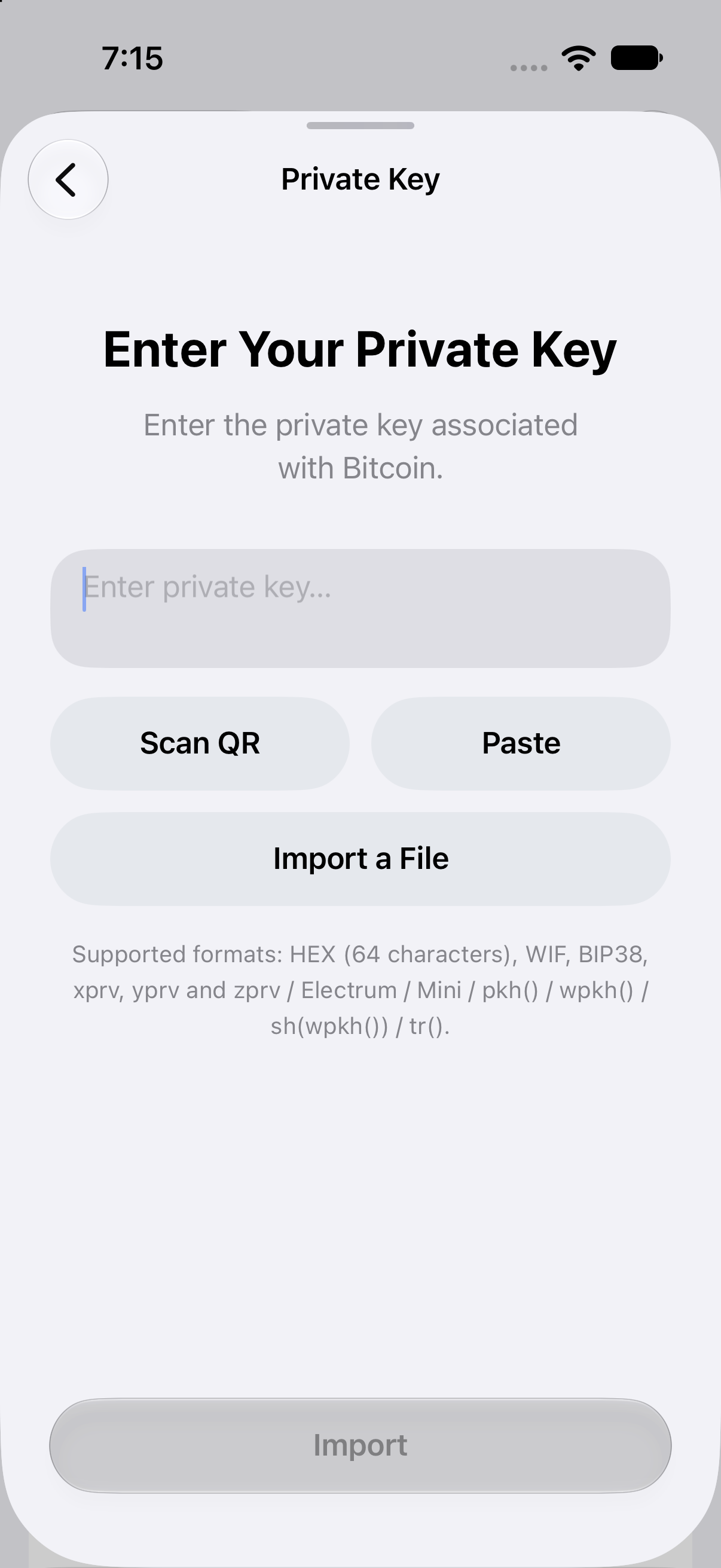
Bitcoin import in Aperture 3.5.4 (55). Import a File opens Apple’s Files picker. This demonstration contains no private key.
File parsing and password processing happen locally. Aperture does not submit the backup or its password to a provider for conversion. After import, balance and transaction discovery still require network requests involving public wallet information. Local decryption should not be confused with an entirely offline wallet experience.
Importing does not move the coins. It gives another installation access to the same keys. The previous wallet can still control those funds. If a key was exposed before import, bringing it into Aperture does not make that old key secret again.
BRD wallets get their own place in Bitcoin settings
The update adds BRD Legacy and BRD Native SegWit support across Bitcoin address derivation, discovery, balances, receiving, sending, change, and key export.
Older BRD wallets use a different account derivation convention from the familiar BIP44 or BIP84 account paths. Recovering the correct words while looking only at a different path can make an existing wallet appear empty. An empty balance in that situation does not establish that the coins are gone.
In Aperture, the BRD families appear alongside the standard Bitcoin address types. For a recovery-phrase wallet, open Bitcoin, choose Receive, open the address-type menu, and choose Settings to inspect the available families. Your wallet’s imported material determines which policies are available; a single imported key does not necessarily support every family shown in a full recovery-phrase wallet.
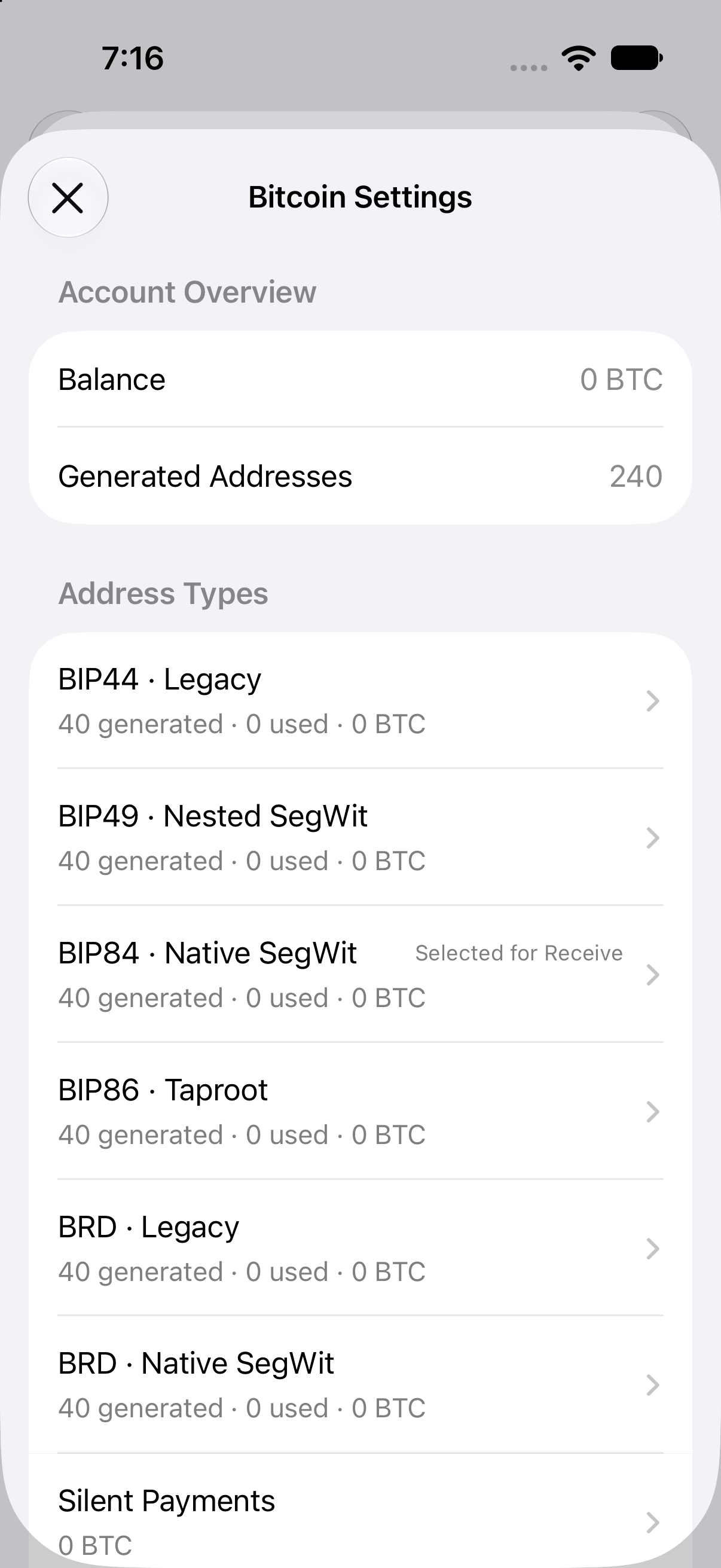
A full recovery-phrase demonstration wallet in 3.5.4 (55). BRD Legacy and BRD Native SegWit appear beside the standard families. The generated-address count belongs to this empty example, not every wallet.
Choosing an address family for Receive changes which kind of address the app presents. It does not transfer your balance between formats. Existing coins remain at their existing outputs until a transaction spends them.
Address indexes still matter, especially for an older wallet that used custom ranges. Automatic discovery follows supported ranges and gap rules; it is not an unlimited search through every possible index. Our complete Bitcoin settings guide covers selecting indexes, generating address ranges, change, and the consequences of using unusually high indexes.
Back up the collection, not just one of its keys
A wallet recovered from a file may contain many independent keys or several derivation sources. A backup of one key can restore that key perfectly while missing the rest of the wallet.
Version 3.5.4 improves preservation of imported Bitcoin collections through Aperture’s collection export, encrypted backup and restore, and direct device migration. The important material travels together: the secret collection and the supported address policies and derivation information needed to use it correctly.
After importing a collection, make a fresh complete backup through the appropriate Aperture backup route. Keep the original source backup until you have verified recovery. Do not assume that recovery words from another wallet also cover independently imported keys.
If you are changing phones, update both installations before using the supported transfer workflow and verify the receiving device before erasing the old one. The direct iPhone transfer guide explains that process. Transfer is useful when both devices work; an independent backup is what you need when the old device is unavailable.
Silent Payment recovery: preserve the whole descriptor
Silent Payments already let a sender derive a fresh on-chain destination from a reusable payment address. The 3.5.4 change concerns recovery of an individual output you have received, rather than the introduction of Silent Payments themselves. The underlying protocol is described in BIP352.
An eligible unspent Silent Payment output can now be exported as a checksummed rawtr private descriptor. This is a precise instruction to use the supplied key as the final Taproot output key.
That wording matters. Ordinary Taproot construction can apply an additional key adjustment. If recovery software takes this output’s key and applies that adjustment again, it can derive a different destination. A private key can be mathematically valid and still be used with the wrong spending policy.
The rawtr descriptor preserves the intended meaning through supported text, QR, and file import, as well as backup and migration. Aperture checks the output’s ownership before making it available for export. Spent or orphaned outputs are excluded from this recovery route.
How to use the output recovery route
Open Bitcoin’s Receive screen and enter Settings from the address-type menu.
Open Silent Payments and select an eligible unspent output.
Choose Export Private Key and complete the app’s existing authorization when requested.
Preserve the entire rawtr descriptor, including its checksum. Do not extract just the inner key or remove the surrounding policy.
Import the complete descriptor into Aperture or another wallet that explicitly supports this raw Taproot form, then verify that it resolves to the expected output.
The recovery screen contains spending material, so it is intentionally not pictured in this article. Treat both its QR code and text as a private key. Aperture’s copy action is local to the device and expires after two minutes; that does not remove copies saved elsewhere.
This export covers the selected output. It does not replace the original wallet’s recovery material or provide a backup of future Silent Payments. Keep the recovery phrase, any applicable passphrase, and the information needed to restore and scan the original wallet. Our Silent Payments guide explains the wider receiving and scanning model.
Coin Control has a clearer job in Send
Bitcoin balances are made up of unspent transaction outputs, often called UTXOs. A transaction selects some of those outputs as inputs, pays the recipient, and normally returns any remainder as change. Choosing inputs affects the transaction’s size and can reveal relationships between previously separate outputs. The Bitcoin developer guide explains this input-and-output model.
In 3.5.4, Coin Control is separate from Network Fee in the amount screen’s options menu. This separates two decisions: which outputs to spend, and how to price the transaction’s fee.
Automatic selection now provides a preview of the inputs selected for the current amount and fee conditions. If you have not entered a positive amount, the app asks you to enter one before inspecting that selection. There is no meaningful payment to assemble yet.
Manual selection lets you choose specific available outputs. Address-type labels help identify what you are selecting, alongside amounts and confirmations. The selection belongs to the current send draft and is checked again as the transaction proceeds. Selecting too little to cover the payment and fee does not authorize the app to quietly add other inputs.
To inspect it, choose Bitcoin in Send, enter the recipient, continue to the amount screen, enter an amount, and open the options menu. Choose Coin Control to inspect automatic selection or make a manual choice. Use Network Fee when you want to change fee settings.
This release also corrects handling of manually selected inputs in the shared imported-wallet and Silent Payment signing path. The complete selected set is included when calculating fees, change, and signatures. A manual selection must mean the whole selection throughout the transaction.
Automatic selection is a sensible starting point when you do not need a particular set of outputs. Manual selection is useful when you have a reason to keep some outputs separate or spend specific ones. More inputs can mean a larger fee, and combining them can make their relationship visible on-chain. Coin Control provides a choice; it does not make a transaction anonymous.
Review now checks the coin that pays the fee
A token balance and a fee balance are different things. You can hold USDC on an EVM network and still lack the native coin needed to transfer it. On Ethereum, transaction gas is paid in ETH; see the official gas documentation. On other networks, use the fee asset required by that network.
For example, sending USDC on Arbitrum requires fee funding on Arbitrum. ETH sitting on Ethereum mainnet does not automatically fund that transaction. A large combined portfolio value cannot substitute for funds on the correct chain.
Version 3.5.4 strengthens the live funding check in Review. The flow checks the send amount and native fee requirement before allowing the transaction to proceed. When native fee funding is missing, it can open a deposit screen for the correct network’s native coin.
That deposit screen gives you the relevant receiving destination. It is not a swap, purchase, or bridge. Funds sent to it still need to arrive on the network shown.
Native-coin amounts can adjust to leave room for fees
When you send the network’s native coin, the payment and fee draw from the same balance. If the requested amount would leave too little for the estimated fee and any applicable reserve, Aperture can reduce the send amount to what is available after those requirements.
This is not limited to tapping Max. It also applies when a manually entered native-coin amount exceeds what remains available after fees. If the requested amount already fits, it is preserved. If nothing usable remains, the flow cannot continue with a zero-value payment.
Read the amount in Review, especially when paying an exact invoice. If it has been reduced, the recipient would receive that smaller amount. Add sufficient funds or reconsider the payment before confirming. A later balance increase does not silently increase the already adjusted amount.
For token transfers, the token amount stays unchanged. You must fund the network fee separately in the required native coin. The app does not solve a missing gas balance by silently selling part of the token payment.
Notifications that are easier to act on
Notifications are most useful when you can understand them immediately and inspect what happened next. The update improves localized notification content, amount formatting, asset artwork, and the transaction details opened from an alert.
Open Settings → Notifications to review the master switch and the separate choices for incoming transfers, outgoing transfers, and announcements. The release improves how the notification experience follows those preferences.
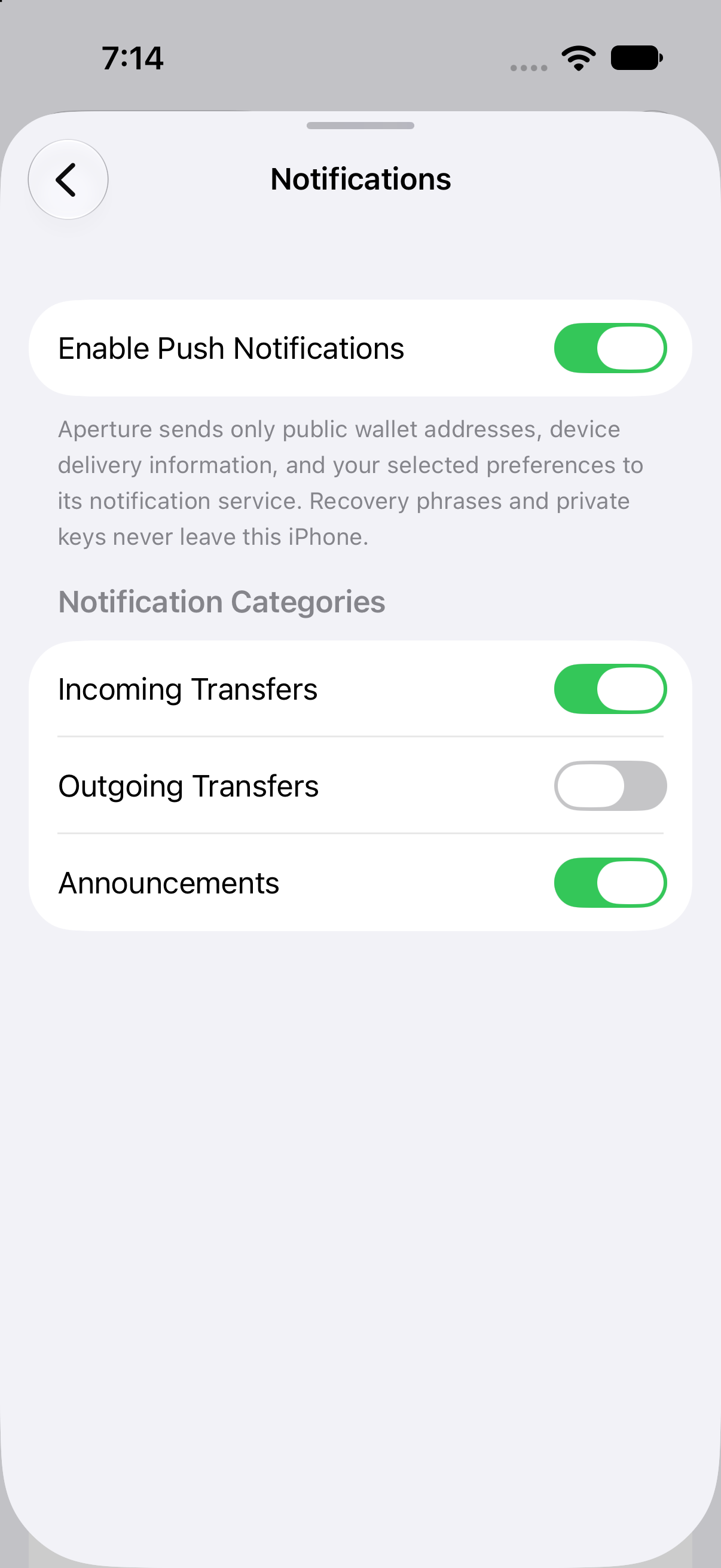
Notification preferences in Aperture 3.5.4 (55). These are the demonstration wallet’s current selections, not a recommendation or a statement of default settings.
Opening a transaction alert now leads to details that check the current transaction status. An earlier notification is a record of what was observed at that time, not a permanent guarantee of confirmation. If current details cannot be retrieved, the interface explains that limitation and offers a retry.
Amounts follow the notification’s localization and formatting context, with fiat information where available. Asset artwork helps distinguish the transaction being described. Delivery still depends on supported monitoring, network access, system notification permissions, and device delivery; this is not a promise that every event appears instantly.
The settings screen also explains the privacy boundary. The notification service receives public wallet addresses, device delivery information, and selected preferences. It does not receive recovery phrases or private keys for notification monitoring. Public addresses can still reveal financial activity, so this is a meaningful setting to review.
Smaller changes that matter in ordinary use
Receive names the network more precisely
Avalanche receiving now identifies Avalanche C-Chain. That is useful because “Avalanche” alone can be too vague when a sender or exchange offers several network choices. Match the actual destination network before sending.
Receive also explains the memo behavior for Aperture-controlled Stellar and Gram addresses. A memo is not required for those wallet addresses. If the sending service requires one, the screen explains that a valid memo can be entered without changing receipt by your wallet.
Keep that guidance attached to its context. An exchange or another custodial recipient may require a particular memo to credit your deposit. The fact that your own Aperture address does not need one says nothing about somebody else’s receiving requirements.
Solana loading and Sui transfers
Solana balance and history requests have been improved. For users, the purpose is straightforward: retrieve the information needed to understand the account more reliably.
Sui work addresses transfer submission, provider access failures, and transaction-history handling. An uncertain submission result is handled conservatively: the app attempts to reconcile what happened rather than automatically creating a new replacement transaction. A missing response does not necessarily mean nothing reached the network.
The release also fixes handling of fractional transaction timestamps on older iOS versions. These are reliability corrections, not a change to network confirmation rules or a guarantee against provider outages.
Layout, typing, and the details you edit
The update includes iOS 27 compatibility work, right-to-left layout corrections, clearer chain-specific recipient hints, keyboard stability fixes, and improved network-selector spacing. Translation corrections accompany these changes, and new release descriptions are available across the 57 shipped languages.
Transaction notes still save while you edit them. The extra checkmark has been removed from the Transaction Details navigation bar; the editing toolbar owns the save action, and Done also commits the note. The change removes duplicate controls without removing note editing.
Wikipedia asset descriptions have been removed. Asset identity, balances, and transaction actions remain the information to use when deciding what you are holding or sending.
Check your build, then try the changes that fit your wallet
Open Settings → About to see the installed version and build number. Version History now distinguishes builds within the same app version and provides expanded Bitcoin release descriptions.
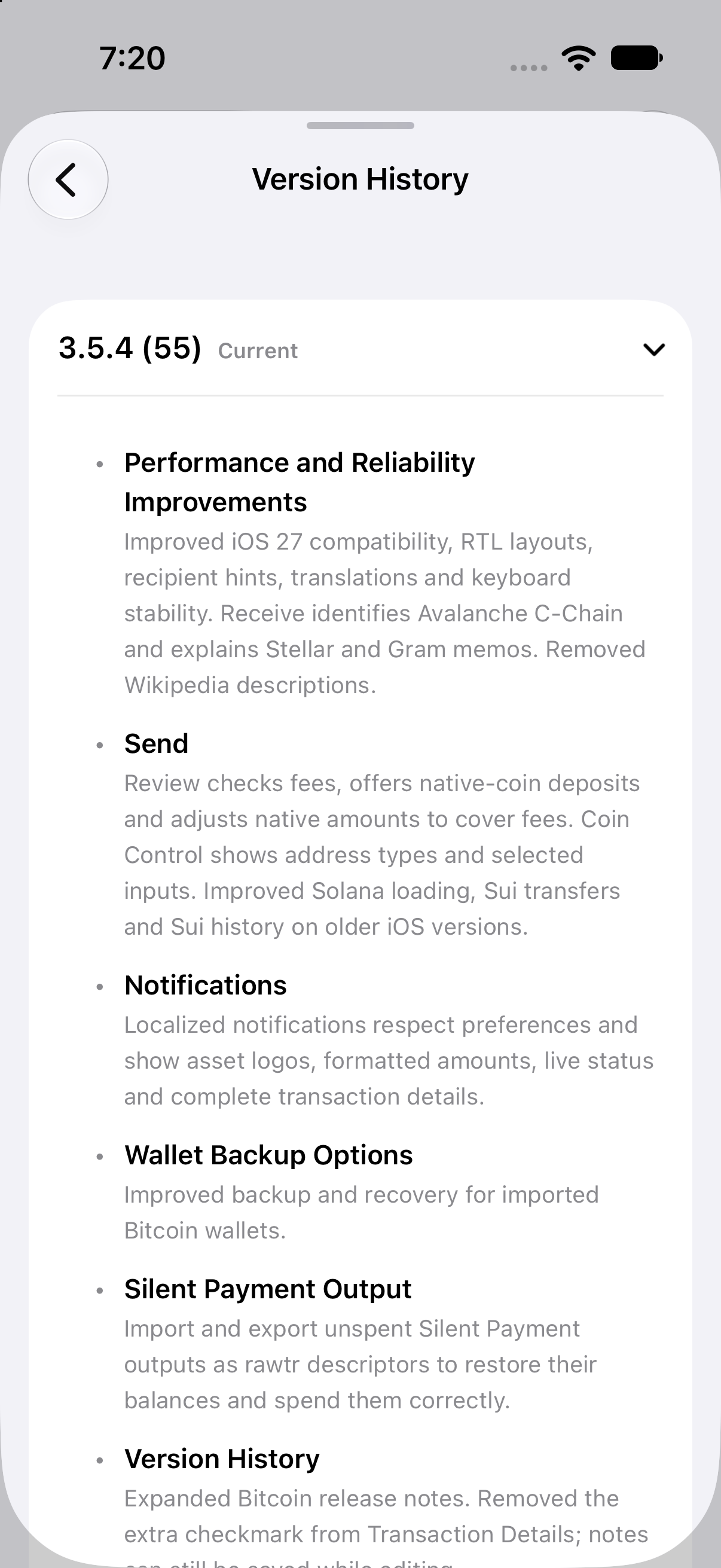
The installed build is identified as 3.5.4 (55). Scroll within Version History to read the remaining notes and earlier builds.
If you already use Aperture, installing an update does not mean you should erase your wallet or repeat an import. Start with the changes relevant to you: inspect Coin Control before your next Bitcoin send, read the amount and fee funding in Review, and check your notification preferences.
If you are recovering an older wallet, take more time. Identify the original format, choose a supported complete backup, compare known addresses, and verify the result before retiring the original recovery route. If the wallet contains imported keys, make sure your new backup covers the entire collection.
The value of 3.5.4 is in these concrete moments: an older backup retaining its meaning, a Silent Payment output recovering to the correct destination, a manual input selection staying intact, and a fee requirement appearing before you authorize the payment.
Self-custody gives you the final decision. The wallet should give you enough accurate information to make it.