A wallet address is exact, but it is not friendly. One wrong character can destroy a payment, and two different networks can present addresses that look deceptively similar. Human-readable names improve that interface—but they do not replace the address underneath. They create a resolution step between what you type and what the blockchain receives.
Aperture makes that step explicit. Choose the asset and mainnet first. Enter a supported name. Aperture identifies the naming system, requests the record for that network, validates the returned address using the same mainnet rules used by Send, and enables Continue only after those checks succeed. The transaction is ultimately built for the resolved cryptographic address, never for the label itself.
A name is an instruction to find an address. It is not proof of who controls that address, and it is never permission to skip the final check.
Real names in the real Aperture Send flow
Every interface image in this guide is a genuine Aperture 2.40.12 screen captured from the iOS Simulator. The examples—nick.eth, sns.sol, spaceid.bnb, and jerry@binance—were resolved through the production Send flow on August 31, 2026. No transaction was signed or broadcast, the wallet remained unfunded, and no recovery phrase, private key, passcode, or private user address appears in the captures.
Name records can be changed by their authorized controller, transferred with a domain, or updated by a provider. These screenshots prove what Aperture accepted at capture time; they are not a permanent endorsement of an identity or destination. When money is involved, verify the current name with the recipient through an independent channel.
What happens between typing and Continue
Aperture resolves a complete supported name after a short 300-millisecond typing pause. That delay avoids launching a lookup for every keystroke while still making resolution feel immediate. Prefilled and pasted names follow the same entry-time path; Continue does not start resolution as a hidden side effect.
Select the asset and network. This determines which address format and which name record are allowed. Ethereum, Solana, and BNB Smart Chain are not interchangeable choices.
Enter one complete name. Aperture recognizes ENS .eth, Solana .sol, supported SPACE ID suffixes, and payment IDs containing one @ separator.
Resolve the network-specific record. The service returns an address for the selected chain or chain family. A record for another network is not silently substituted.
Validate the result. The existing mainnet address validator must prove that the returned value is valid for the selected network. A malformed response never becomes a recipient.
Continue with the address. The resolved address—not the display name—moves into Amount, Review, signing, and broadcast.
A successful lookup is cached in memory for five minutes to avoid needless repeated requests during the same session. Editing the recipient or leaving the screen cancels an in-flight lookup. Names and resolved addresses are not persisted as wallet secrets, and the resolver cannot access a recovery phrase or private key.
ENS: one .eth name, a record selected for the network
ENS is often described as Ethereum’s naming system, but an ENS name can hold addresses for several blockchains. Resolution always begins from Ethereum mainnet; the selected destination network determines which address record Aperture requests. The official ENS address-lookup documentation describes the same model: Ethereum uses its normal address record, non-EVM chains use SLIP-44 coin types, and other EVM chains use ENSIP-11 chain-derived coin types.
In Aperture, a .eth name can be evaluated for every network whose ENS address encoding the app can decode and validate. Ethereum uses coin type 60. Bitcoin, Litecoin, Dogecoin, Bitcoin Cash, TRON, and Solana use their standard multichain coin types. Other supported EVM mainnets use the ENSIP-11 rule: the chain ID with the high bit set. The name still resolves through Ethereum mainnet even when the requested destination is Base, Arbitrum, Polygon, or another supported EVM network.
Aperture normalizes ENS input using the official ENS normalization implementation instead of lowercasing arbitrary Unicode and hoping for the best. This matters because visually similar characters, composed forms, and invalid labels must be treated consistently before a namehash or resolver request is produced. The final address record is decoded losslessly and then passed through the selected network’s validator.
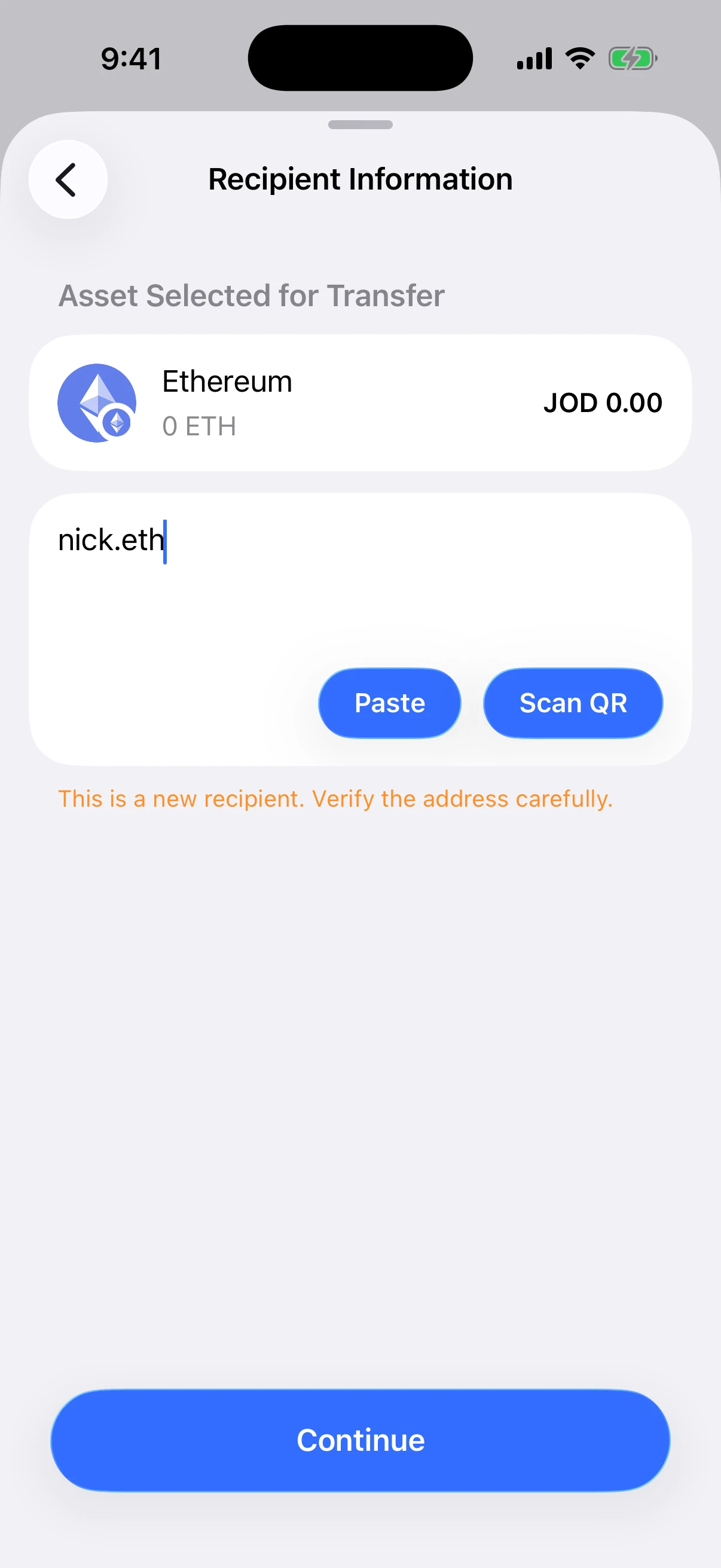
Real Aperture Simulator capture. nick.eth resolved for Ethereum, Continue became available, and Aperture still warned that this was a new recipient whose destination should be checked.
The orange familiarity warning is intentional. A technically valid name and address do not prove that the recipient is the person you intended. Aperture records familiarity only after an accepted in-app broadcast from this wallet; a first-time destination remains “new” even when it came from a well-formed name.
Why .eth is correct—and .ens is not
ENS is the service name; .eth is the namespace used for normal ENS registrations. Typing a name ending in .ens is a common human mistake, so Aperture identifies it precisely and explains the correction instead of reducing it to a generic invalid-address message.
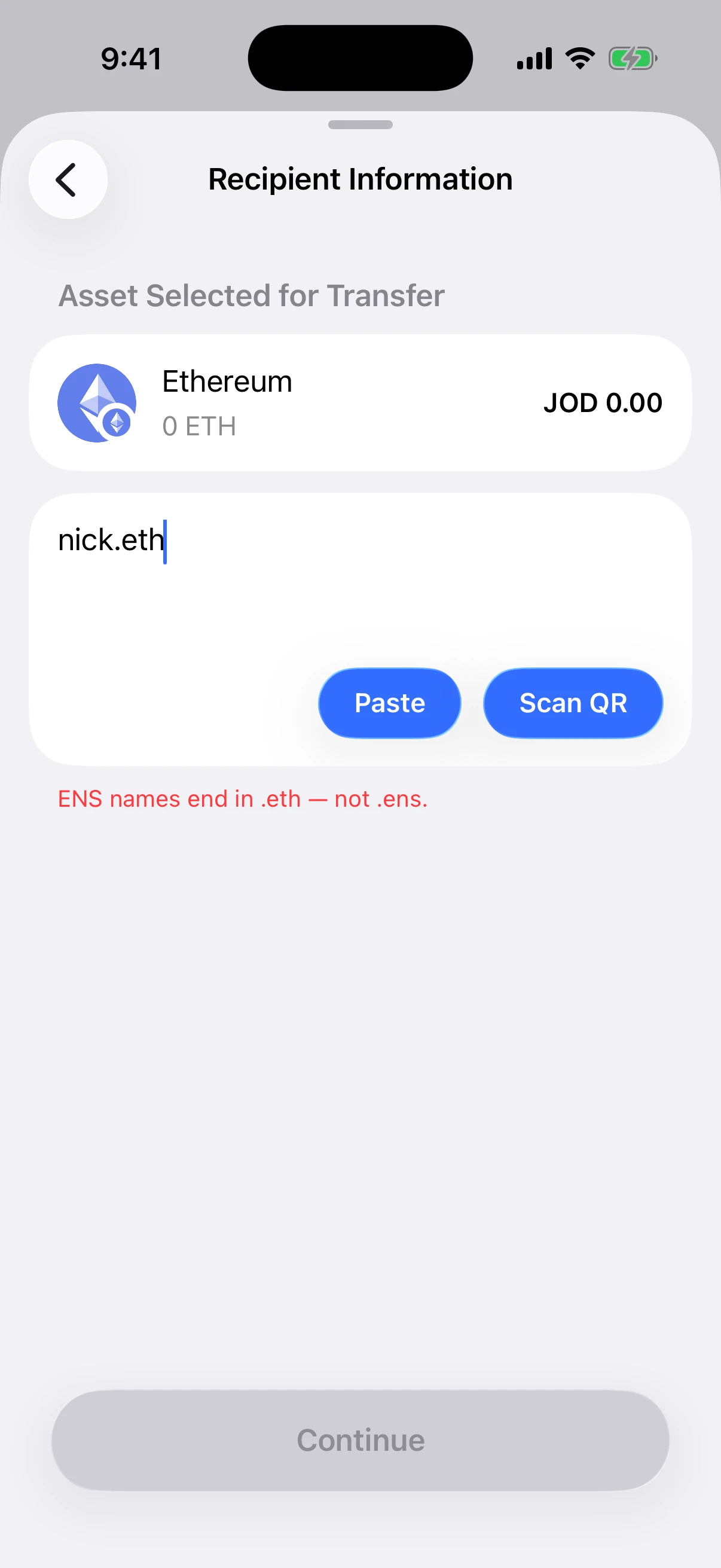
Real production validation. Aperture keeps Continue disabled and explains that ENS names end in .eth, not .ens.
That direct error is safer than guessing. Aperture also rejects empty labels, whitespace, control characters, URL paths, query strings, fragments, and unsupported suffixes before a network request. Recipient input is limited to 255 UTF-8 bytes, which bounds both local parsing and remote resolution.
.sol: Solana Name Service first, with a controlled fallback
A .sol name is routed only to Solana in Aperture. The app first asks the official Solana Name Service resolver. SNS resolution is more than reading the current NFT owner: its on-chain resolution specification checks tokenization and valid SOL records before falling back to the appropriate owner. That ordering is designed to avoid paying an outdated destination after a domain changes hands.
If SNS reports no record, is temporarily unavailable, or returns a response Aperture cannot validate, Aperture checks SPACE ID as a secondary .sol namespace. A valid SNS answer always wins. Regardless of source, the returned value must still be a valid Solana mainnet public key before Continue can activate.
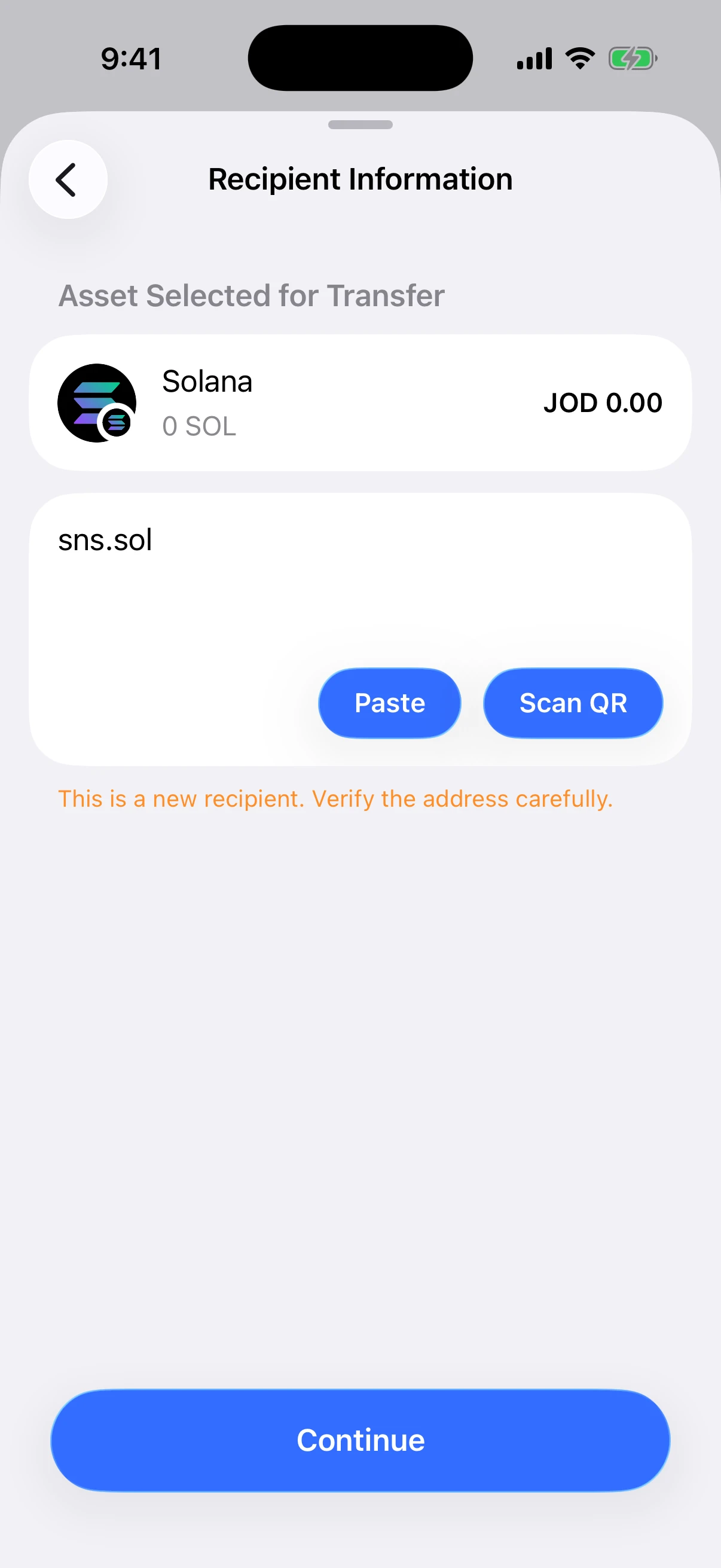
Real Aperture Simulator capture. The public sns.sol example resolved on Solana and enabled Continue without exposing or using any private wallet material.
This network pinning is important. A .sol name cannot be pasted into an Ethereum or BNB Smart Chain send and treated as a generic identity. The name identifies a Solana destination. If the asset and suffix disagree, stop and choose the correct mainnet rather than trying to force the label through.
SPACE ID domains: the suffix chooses the mainnet
SPACE ID aggregates several chain-specific namespaces. Aperture supports the namespaces it can route and validate unambiguously:
.bnb and .four resolve only for BNB Smart Chain.
.arb resolves only for Arbitrum One.
.gno resolves only for Gnosis.
.taiko resolves only for Taiko mainnet.
The suffix is routing information, not decoration. A spaceid.bnb answer is expected to be a BNB Smart Chain-compatible EVM address. A registry.arb answer belongs in an Arbitrum send. Aperture refuses to reinterpret one namespace as another network merely because several EVM chains share the same 0x address shape.
SPACE ID’s official Web3 Name API documentation says its responses are queried from on-chain data and documents the same domain-to-address interface Aperture uses. The API returning code 0 is only the service-level success condition; Aperture performs its own network validation afterward.
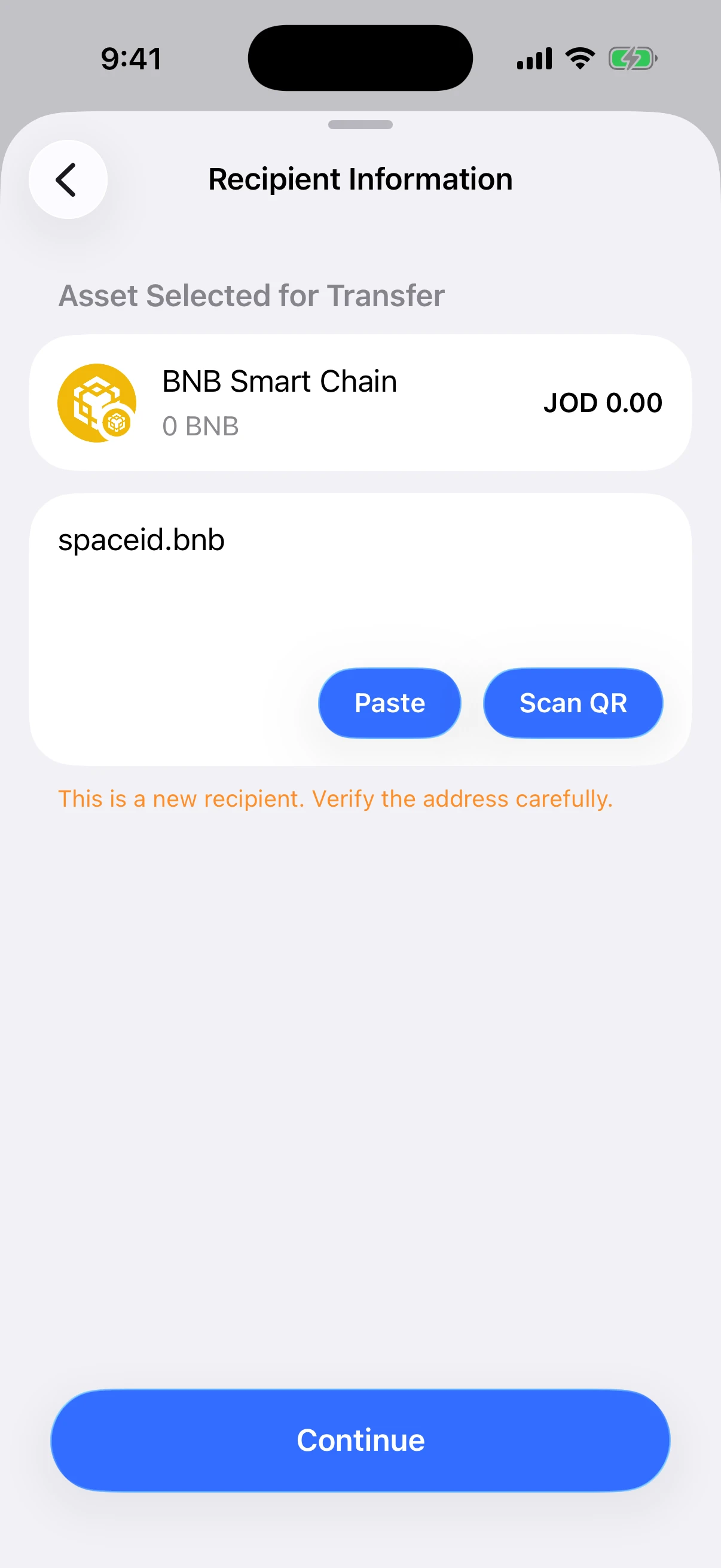
Real Aperture Simulator capture. spaceid.bnb resolved for the selected BNB Smart Chain asset, and the first-recipient warning remained visible.
Payment IDs: one name, an address chosen by chain family
A payment ID looks like name@provider. It may resemble an email address, but in the Send field it is a payment-routing identifier. SPACE ID describes payment IDs as human-readable identifiers that can map to different blockchain addresses for the same provider relationship. Its public documentation uses jerry@binance as an example.
Aperture supports payment-ID resolution for these address families:
EVM for supported EVM mainnets such as Ethereum, BNB Smart Chain, Base, Arbitrum, Polygon, and others in Aperture.
Bitcoin for a Bitcoin mainnet destination.
Solana for a Solana mainnet public key.
TRON for a TRON mainnet address.
The provider portion may contain ASCII letters, digits, hyphens, underscores, and dots. Aperture requires exactly one nonempty name and one nonempty provider around the @ separator. Other malformed forms are rejected locally. The selected asset determines which family Aperture requests, and the resulting address must validate on that network.
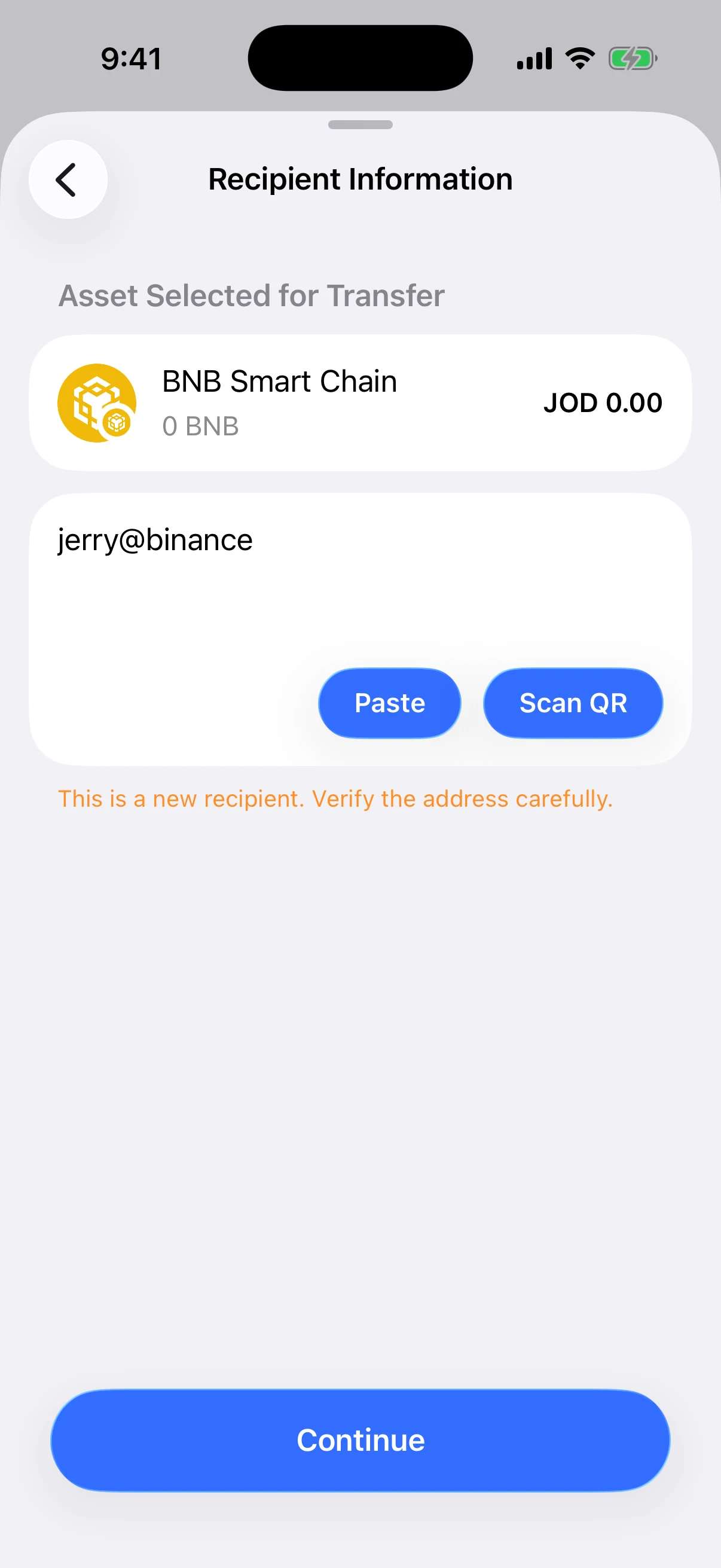
Real Aperture Simulator capture. The public jerry@binance example resolved through the production payment-ID path for BNB Smart Chain. No transfer was submitted.
A valid EVM-shaped result does not prove that an exchange or payment provider supports deposits on every EVM network. Address validation answers “is this a valid destination format for the selected chain?” It does not answer “will this provider credit my account on that chain?” Confirm the supported deposit network and any provider requirements before sending.
What Continue proves—and what it cannot prove
When Continue becomes active after name resolution, Aperture has established several concrete facts: the input matches a supported naming syntax, the suffix or payment-ID family is compatible with the selected mainnet, the naming service returned a usable result, and that result passed the app’s production address validator.
Continue does not prove that:
the name belongs to the person or company you had in mind;
the domain has not been sold, transferred, or updated since your last payment;
the recipient monitors the selected network or token;
an exchange will credit the deposit without a memo, tag, or account-specific rule;
a visually similar Unicode name is the same registered name; or
the payment amount, fee, or asset selection is correct.
Treat name resolution as high-quality input validation, not an identity guarantee. Ask the recipient to confirm the exact spelling and network, use a trusted invoice or profile, and compare the resolved address on Review when the payment is important. For a first payment, a small test transfer can reduce—but never eliminate—operational risk.
The errors are specific because the fixes are different
Unsupported service. The name has a dotted suffix Aperture does not route. Use a supported namespace or a raw mainnet address from the recipient.
Wrong network. The name belongs to another chain, such as .sol in a BNB Smart Chain send. Go back and select the correct asset and network.
Name not found. The naming service returned no matching name. Recheck every character and confirm that the name is registered.
No record for this network. The name exists but does not publish an address record for the selected chain. Ask for another supported record or a direct address.
Service unavailable. The resolver or transport did not complete. Retry after verifying connectivity; do not substitute a guessed address.
Response could not be validated. The service returned malformed or unexpected data. Aperture stops rather than accepting it.
Resolved address is invalid. The response is not a valid mainnet address for the selected network. Continue remains disabled.
Transient resolver errors expose Retry when retrying is meaningful. Definitive syntax and network mismatches require correcting the input or selected network instead.
A safe name-payment routine
Confirm the asset and mainnet before typing. The network determines which address record is requested.
Get the exact name from an independent source. Avoid retyping names from a direct message when an official profile, invoice, or in-person confirmation exists.
Read every label and suffix. nick.eth, nick.ens, nick.sol, and nick.bnb are different inputs.
Wait for resolution to finish. Do not treat the visible name alone as a validated recipient. Continue should become active without an error.
Respect the new-recipient warning. It means this wallet has no accepted in-app broadcast history for the resolved destination on that mainnet.
Verify the resolved address on Review. For a high-value transfer, compare the complete address with a source the recipient controls.
Check provider-specific deposit rules. Payment IDs do not override exchange network support, minimum deposits, token contracts, memos, or tags.
Review amount and network fee separately. A correct recipient does not make an incorrect amount safe.
Keep the transaction ID. After broadcast, use the hash and matching explorer to verify the public result.
Questions people ask
Does Aperture send the name to the blockchain? No. The name is resolved before signing. The transaction uses the resulting mainnet address.
Can the same ENS name work on several networks? Yes, if the name publishes valid records for those networks. Aperture requests the record corresponding to the selected chain and will report when no record exists.
Why can the same payment ID return different addresses? Payment IDs are designed to select an address by chain family. The Bitcoin, Solana, TRON, and EVM answers can be different.
Why does Aperture warn that a resolved name is a new recipient? Name validity is separate from wallet history. Until this wallet records an accepted in-app send to that exact destination and routing context, the recipient remains new.
Can a name change where it resolves? Yes. Authorized controllers, domain transfers, record updates, and provider mappings can change the destination. Re-verify names for every important payment.
Does Aperture save my resolved names? Successful answers are cached in memory for five minutes. The resolver does not persist names or resolved addresses as wallet secrets, and leaving or editing cancels active work.
Is jerry@binance an email address? In this context it is a public payment-ID example documented by SPACE ID. Do not assume every email-like string is a supported payment ID or that it maps to a deposit address on every network.
Names make sending easier; verification keeps it safe
Human-readable recipients solve a real interface problem. They let someone share nick.eth, sns.sol, spaceid.bnb, or a payment ID instead of reciting an opaque machine string. Aperture adds the controls that make that convenience usable in a self-custody wallet: explicit network selection, strict service parsing, network-specific resolution, address validation, cancellation, concrete errors, and a final resolved address for signing.
The safest mental model is simple: the name helps you ask for the destination; the selected mainnet defines which destination is relevant; Aperture validates the answer; and you still decide whether that answer belongs to the person you intend to pay.
Read the name. Confirm the network. Verify the address. Then—and only then—send.
Continue learning
For the complete payment sequence after a name resolves, read Send Crypto Without Guesswork: From Recipient to Finality. To understand why the network selection comes before the address, continue with One Wallet, Many Mainnets: How Aperture Keeps Accounts and Networks Separate. If the recipient shares a QR instead of a name, use Receive Crypto Safely: Network, Address, QR Code, and Requested Amounts. After broadcast, verify the receipt with Understand Any Transaction: Status, Hash, Fees, Addresses, and Local Notes.