
Your Bitcoin wallet is larger than the address on its Receive screen.
Behind that one destination are address families, numbered receive and change chains, a history of used outputs, and rules for deciding what to show next. Those details become practical very quickly: when an exchange rejects an address format, when you restore an older wallet, when you want a particular index, or when a transaction sends change somewhere you do not recognize.
Aperture exposes those controls. This guide explains what each one changes, how to use it, and where its limits matter. You do not need to become a Bitcoin developer to follow it. You do need to distinguish a few things that wallet interfaces often compress into the same word.
The walkthrough uses Aperture 3.5.3, build 52, with an empty demonstration wallet in the iOS Simulator. Screenshots are genuine app captures; selected images are cropped to exclude addresses, QR codes, and public-key data. Labels are shown in English. Available settings depend on how the wallet was created or imported.
1. Start here: opening Bitcoin Settings
From the wallet’s asset list, open Bitcoin, then tap Receive. On Receive BTC, open the menu in the upper-right corner. It contains two destinations:
Types changes the Bitcoin receiving format shown on the Receive screen.
Settings opens the detailed Bitcoin account, address, generation, and Silent Payments views.
For an ordinary wallet created from a BIP-39 recovery phrase, Settings lists BIP44, BIP49, BIP84, BIP86, BRD Legacy, BRD Native SegWit, and Silent Payments. A wallet imported from a single private key or a different recovery format does not necessarily have this full structure.
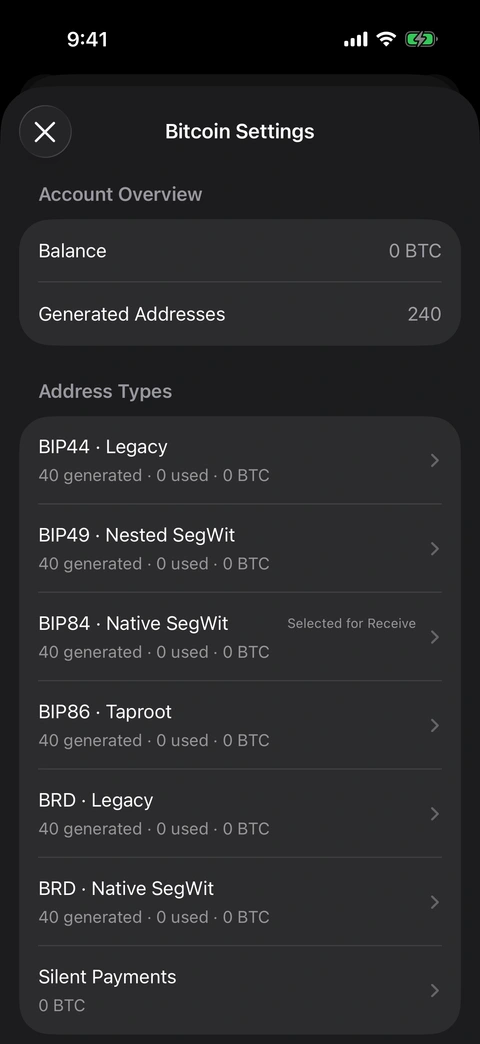
The empty demonstration wallet starts with 240 generated addresses. Each ordinary family has its own receive and change inventory.
The overview shows a Bitcoin balance and a count of generated addresses. Under each address family you can see its generated count, used count, and balance. Selected for Receive identifies the ordinary address family currently chosen for receiving. This is a receiving preference; it does not transfer coins from the other families.
The empty wallet pictured here starts with 240 generated addresses: six families, each with 20 receiving addresses and 20 change addresses. That is an address inventory, not 240 funded accounts. Different imports and wallets with existing history can have different counts.
2. One Bitcoin balance can involve many addresses
Bitcoin payments create outputs. An output that has not yet been spent is a UTXO: an unspent transaction output. Your wallet’s job is to identify the outputs it can spend and present their value coherently.
You might receive one payment at a Native SegWit address, another at a Taproot address, and another through Silent Payments. Aperture can account for the discovered funds across those supported paths without making you treat each address as a separate wallet.
Changing the receiving type does not exchange your bitcoin, move it to another network, or rewrite an existing transaction. The coins already received remain governed by the scripts that received them. Spending them later requires a Bitcoin transaction.
This distinction also explains why an empty address is not proof of an empty wallet. It may simply be one unused destination in a much larger set.
3. The address types, in plain language
All the following destinations are for Bitcoin mainnet. They are not separate coins. The format determines the payment script and the derivation convention the wallet uses to find its keys.
BIP84 · Native SegWit
These receiving addresses begin with bc1q. Aperture’s standard BIP84 account uses the path m/84'/0'/0'. For a new ordinary BIP-39 wallet, this is the receiving family shown in our walkthrough.
Native SegWit avoids the extra script wrapper used by Nested SegWit. It is a practical choice when the sender supports it. Actual transaction fees still depend on the inputs, outputs, and chosen fee rate; choosing an address type does not fix a transaction’s price. BIP84 specification
BIP86 · Taproot
These addresses begin with bc1p. Aperture uses the standard single-key Taproot account path m/86'/0'/0'.
This provides a Taproot receiving destination for senders that support it. The BIP86 option is a single-key address family; its presence does not mean the app offers a general multisignature or arbitrary Taproot-script editor. BIP86 specification
BIP49 · Nested SegWit
These addresses begin with 3. Aperture derives them under m/49'/0'/0'. They wrap a SegWit payment in a P2SH format, which can help when an older sending service accepts this format but does not accept native SegWit addresses.
A 3-prefix by itself does not tell you that an address is multisignature: BIP49 addresses also use that prefix. BIP49 specification
BIP44 · Legacy
These addresses begin with 1. Aperture’s account path is m/44'/0'/0'. Legacy support is useful for compatibility and for locating funds originally received through that derivation family.
It is not a requirement for holding “real Bitcoin.” A Legacy destination and a Native SegWit destination both receive BTC on the same network. BIP44 specification
BRD · Legacy and BRD · Native SegWit
These are compatibility paths for the breadwallet/BRD derivation scheme. In this implementation, their account root is m/0', followed by a receive or change branch and an address index.
That root differs from the standard BIP44 and BIP84 roots. Two addresses can have the same visible format while belonging to different derivation paths. The BRD options matter when you are trying to find the destinations an older BRD wallet actually used. Selecting standard BIP84 merely because an old address begins with bc1q is not enough to establish the correct path.
Silent Payments
The sp1 option is different. It is a reusable payment address from which a compatible sender derives a transaction-specific Taproot destination. It is not another ordinary numbered BIP32 receive chain. We cover its scanning and privacy behavior below.
To change an ordinary receiving family, use Receive BTC → upper-right menu → Types, then select the family. Verify the displayed destination and the sender’s supported network before sharing it. Existing receiving addresses remain valid; changing the menu does not revoke them.
4. What an address index actually means
Consider this BIP84 receiving path:
m/84'/0'/0'/0/17
The account root is m/84'/0'/0'. The next 0 identifies the receiving branch. The final 17 is the address index. Indexes begin at zero, so index 17 identifies the eighteenth address in that branch.
For the corresponding change address, the branch changes:
m/84'/0'/0'/1/17
The same final number does not make these the same destination. The whole path matters. Changing the address family also changes the relevant derivation path.
Aperture’s standard account settings use account 0. The custom-index control changes the final address index within a supported family and branch. It is not an account-number selector or an unrestricted derivation-path editor. The standard non-hardened address-index domain is 0 through 2,147,483,647, but the app deliberately generates bounded ranges rather than jumping across that space in one operation.
Given the same recovery material and path, deterministic derivation recreates the same keys. Generating another address does not invent a new recovery phrase. The underlying hierarchy is described in BIP32.
5. Reading an account’s details
In Bitcoin Settings, tap an address family. Its page shows the account derivation path and extended public key, followed by statistics and separate Receive Addresses and Change Addresses lists.
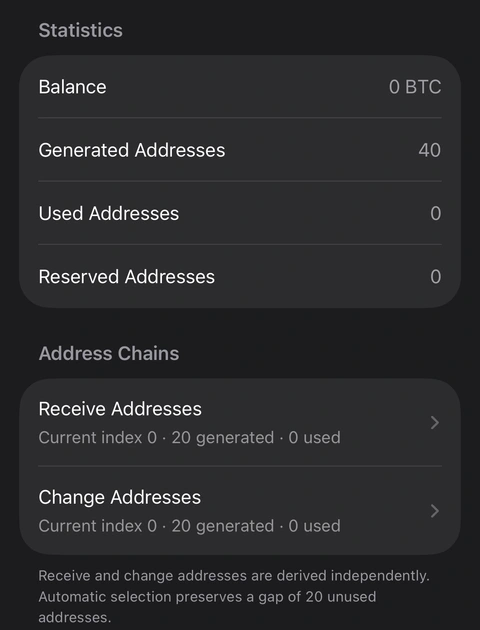
Detail from the Native SegWit account screen. The upper account-key section is excluded from this capture excerpt.
The statistics answer different questions:
Generated Addresses counts addresses the wallet has derived and recorded for that family.
Used Addresses identifies addresses with detected transaction history. A used address can have a zero balance after its outputs are spent.
Reserved Addresses identifies addresses set aside by the wallet, including change destinations reserved during sending. Reserved does not mean a payment has already confirmed.
Balance reports the recorded Bitcoin value for that scope. A refresh or an unfinished scan can matter when interpreting it.
The extended public key—shown as an xpub, ypub, or zpub depending on the family—lets compatible software derive public descendants without receiving the private spending key. It is useful for understanding the account and for compatible monitoring workflows.
Treat it as sensitive financial information. Someone who obtains an account-level extended public key may be able to connect many of that account’s addresses and transactions. It does not, by itself, authorize spending, and it is not a replacement for your recovery backup. Do not post it in a support screenshot.
6. Automatic receiving addresses and the discovery gap
Normally, Aperture chooses receiving addresses automatically. Once an address is recognized as used or otherwise unavailable, the ordinary selection logic moves forward. Reopening Receive before that happens can show the same address; opening the screen is not itself a payment.
Fresh destinations reduce the simplest form of address reuse: publishing the same on-chain destination for every invoice or payment. They do not make transactions anonymous. Combining outputs later, public amounts, timing, and information held by counterparties can still connect activity.
The app’s standard HD discovery uses a 20-address gap. Discovery advances using known used or reserved addresses, checking for further history rather than scanning every mathematically possible destination. The general recovery convention is described in BIP44’s discovery rules.
This is why generating a key and discovering a payment are separate tasks. The key tree can be reproduced exactly while a recovery scan stops before reaching the address you used.
Before using a distant index
In the implementation reviewed for this guide, merely generating a larger unused range does not automatically extend ordinary discovery to the highest generated index. The initial scan range is based on used or reserved history and the gap allowance, rather than every manually generated address or the preferred receiving index.
For example, generating through index 100 and choosing that destination while indexes 0–19 remain unused can place it beyond the normal scan window. That matters in the current wallet as well as in another wallet used for recovery. A zero balance after a normal refresh is not evidence that no payment reached that distant destination.
Use automatic selection or addresses within the active discovery range for routine receiving. If you need a distant index for a specific recovery or compatibility task, establish a recovery method that can explicitly scan the required range before funding it. Keep the family, account path, branch, and index with your private recovery documentation. The generation button is not a promise of unlimited automatic discovery.
7. Generate addresses through a chosen index
The generation screen makes the range explicit. Here is the complete route:
Open Bitcoin Settings and choose the address family.
Scroll to Address Generation, then choose Generate Receive Addresses or Generate Change Addresses. You can also open either address list, scroll to its end, and tap Generate More Addresses.
Confirm Address Chain. Receive and change have separate ranges.
Read Highest Generated Index and Maximum Index for This Batch.
Enter the final index in Generate Through Index, then tap the action with that name.
Wait for the success message, then return to the address list to inspect the generated range.
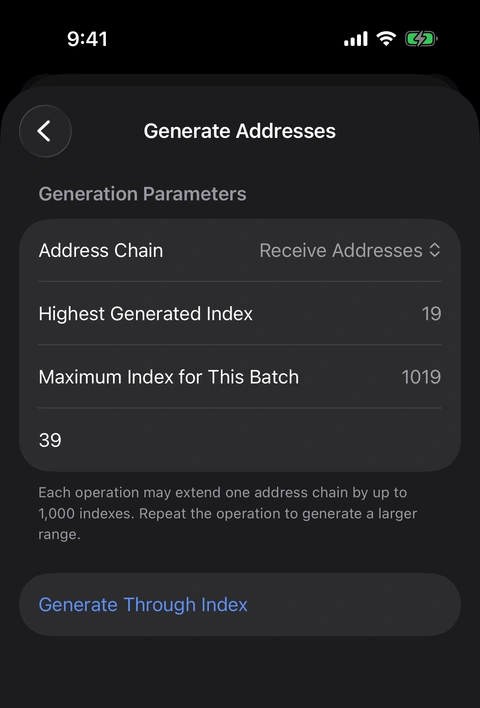
Before generation: this receive chain ends at index 19. The target is inclusive, and the app displays the current batch ceiling.
In our demonstration, the receive chain initially ended at index 19. Entering 39 extended it to include indexes 20–39. The result was 40 receiving addresses, numbered 0–39. It did not create only address 39, and it did not add 39 addresses to the existing total.
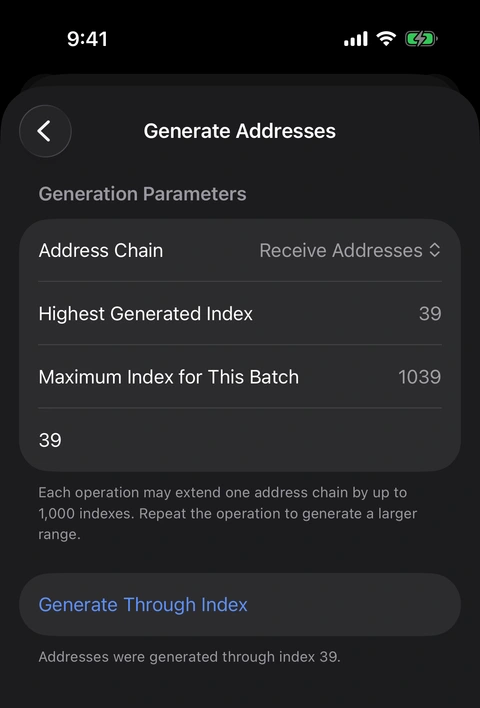
After generation: the highest generated index is 39. No Bitcoin transaction or payment was made.
Each operation can extend one chain by at most 1,000 indexes. Starting at a highest index of 19, the next batch ceiling is 1019. After our smaller extension to 39, the displayed ceiling becomes 1039. Larger ranges require repeated operations and remain subject to the supported derivation bounds.
Generation is a local wallet operation. It does not publish a Bitcoin transaction, incur a miner fee, move a balance, or make an address used. It also does not automatically select the last generated address as the destination shown on Receive. Selection is a separate action.
8. Choose a specific current receiving address
Open Receive Addresses within the appropriate family. The list shows each generated index and its status. Search can match an index, part of an address, or part of its full derivation path. It is a text filter: searching for 7 may also find 17, 27, or an address containing that character. Check the row title and full path before acting.
To select an address:
Open the generated-address row you want.
Check Current Index, Derivation Path, and Current Status.
For an eligible unused, unreserved address, tap Use as Current Address.
Confirm the current-status feedback.
Return to Receive and ensure its Types menu has the same ordinary family selected.
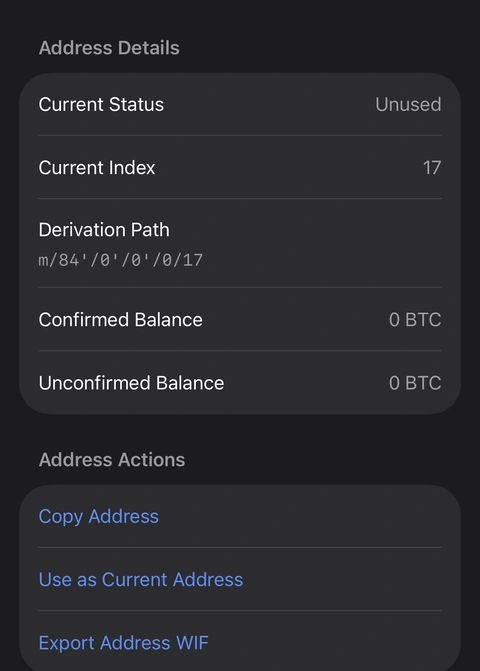
Index 17 is unused. Its full path identifies the account, receiving branch, and address index. The address and QR above this section are excluded.
The example uses BIP84 receive index 17, inside the initial 0–19 range. The action makes it the preferred address for that family and branch. It does not change the Bitcoin network, move money, or make every address family use index 17.
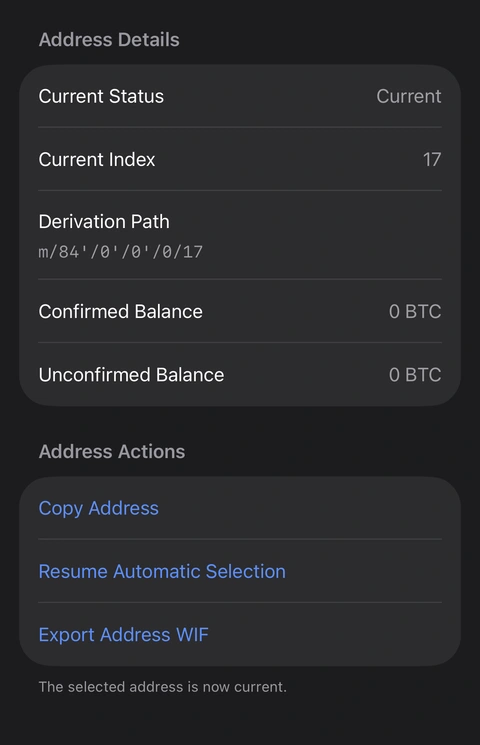
After selection, Current appears and Resume Automatic Selection replaces the selection action. The screenshot ends before any private-key export.
An eligible manually selected receiving address remains preferred until it becomes used or unavailable, or you clear the preference. To let the wallet choose again, return to that address’s detail page and tap Resume Automatic Selection. We verified both actions in the empty demonstration wallet.
The receive preference only controls the corresponding ordinary receiving family. A Silent Payment address is a separate receive presentation and does not become “index 17.”
9. Change addresses: where the remainder goes
A Bitcoin input is spent as a whole. If you spend a 0.01 BTC output to pay 0.003 BTC, the transaction must account for the remainder after the fee. Usually it creates a change output controlled by your own wallet.
That is the purpose of Change Addresses. In the standard paths shown here, the change branch is 1, while the receiving branch is 0. Separating them helps the wallet manage destinations and recognize its own returned value.
The change list has the same generated-address inspection and generation tools. An eligible unused change address can also be selected manually. That preference is consumed when a relevant Bitcoin send reserves the change destination; it is not a transaction by itself. A send that creates no change has no remainder to direct there.
A reserved destination can appear before a transaction confirms. Check actual transaction status rather than interpreting the label as proof that bitcoin has moved.
For most payments, let the wallet select change automatically. Manual change selection is useful when you have a specific tracking or compatibility reason. It is not a way to pick the source coins—that is coin control, discussed below.
10. Address details and exporting one WIF
An ordinary address detail page exposes its receiving QR and address, status, index, derivation path, and confirmed and unconfirmed balances. Copy Address copies the public destination. Export Address WIF has a completely different consequence: it opens access to private spending material after the app’s authentication flow.
WIF means Wallet Import Format. Here it represents a particular address’s private key. It does not back up every other key in the wallet, every change destination, or the wallet’s full recovery structure.
If an advanced recovery task requires it, open the correct family, branch, and address, select Export Address WIF, complete authentication, and use the export only with compatible trusted software. Preserve the address type and derivation context as well. A private-key string alone does not describe every script that software might need to reconstruct.
Never share that WIF or its QR with support, post it, or place it in a tutorial. We show the export entry point in the screenshots, not an exported key. The Backup & Keys flow also organizes Bitcoin key access by the supported family and address, including discovered Silent Payment outputs where available.
For normal backup, preserve the wallet’s original recovery material and any required passphrase rather than collecting isolated WIFs and assuming the collection is complete.
11. Silent Payments: a reusable address with different outputs
Ordinary fresh addresses require you to distribute a new destination. Silent Payments let you share one reusable sp1 payment address while compatible senders construct distinct Taproot outputs for their transactions. The reusable address is not copied directly into each output as an ordinary receive destination. BIP352 specification
In Aperture, open Receive BTC → upper-right menu → Types → Silent Payments, then copy or share the payment address. The sender must support Silent Payments. A service that only accepts ordinary Bitcoin addresses cannot necessarily pay an sp1 address.
In this build, choosing Silent Payments is specific to the current Receive presentation. Reopening Receive restores the last ordinary address-family preference. Choose Silent Payments again when you want to show its reusable address. This is worth checking before copying: the ordinary bc1 destination and the sp1 payment address serve different purposes.
Inspecting scanning and received outputs
Open Bitcoin Settings → Silent Payments. Alongside the address, the page shows:
Balance, Discovered Outputs, Unspent Outputs, and Spent Outputs.
Scan Start Height and Last Scanned Height.
Progress while a scan is active, and the list of discovered outputs when available.
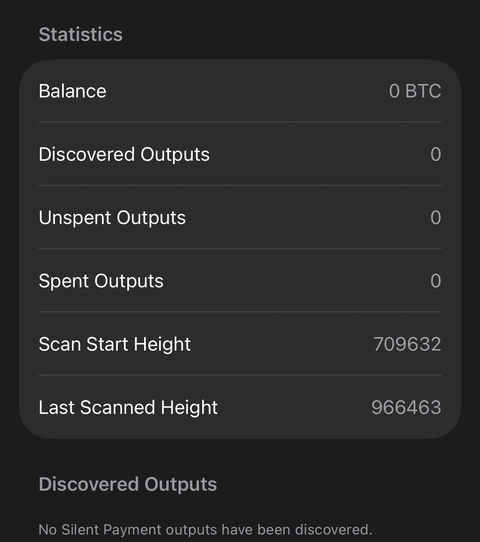
The Silent Payments statistics from the demonstration wallet. Its reusable address and QR are excluded; scan heights are a snapshot, not a current network-height promise.
The demonstration wallet has no received outputs. Its scan-start value is 709632, the Taproot activation height used by this implementation. These height fields are status information, not an arbitrary birthday-height editor on this screen.
For a discovered output, its detail page provides the value, spent or unspent state, transaction hash, output index, block height when known, output public key, and script public key. If the app knows the spending transaction, it can show that reference as well. An authenticated WIF export represents that individual Taproot output key, not the entire Silent Payments account; importing it requires compatible Taproot key-path handling.
The output index on this screen is the output’s position inside a transaction. It is not the ordinary receiving-address index from the BIP84 example.
The privacy boundary users should understand
Silent Payments improve what an outside blockchain observer can link to a published payment address. They do not erase amounts, transaction timing, or information a sender already knows.
Aperture’s current scan integration delegates discovery to a scanning service using the scan private key and spend public key. That gives the service visibility into payments it can detect for this account. Those materials alone do not provide the spend private key needed to spend the outputs. The app validates returned candidates locally, but that does not remove the service’s viewing access.
This is an important distinction between spending authority and privacy. Do not interpret the feature as a promise that no service can associate your Silent Payment receipts. A restored wallet also needs compatible scanning to find its outputs; an ordinary BIP84 address scan is insufficient.
Aperture’s Bitcoin Send implementation supports Silent Payment destinations and spending discovered Silent Payment outputs where the wallet’s signing material and selected inputs support the transaction. Input eligibility and fees still apply. The ordinary Receive settings do not turn an incompatible wallet import into a Silent Payments receiving account.
12. Sending Bitcoin: fees, coin control, RBF, and messages
The Receive settings decide where new payments can arrive. The Send flow decides which outputs leave and how a new transaction is built.
Start with Bitcoin → Send, enter or scan the recipient, and continue to the amount screen. Its transaction-options menu provides Network Fee, Replace-by-Fee, and Insert OP_RETURN for Bitcoin. Review the final destination, amount, fee, and any message before authorizing a real payment.
Network fees and a custom rate
Open Network Fee to review the available estimates or a custom option. Bitcoin fee rates are expressed in satoshis per virtual byte, often written sat/vB. The current custom editor accepts a whole-number rate.
The rate is not the final fee. A transaction with more or larger inputs can cost more than another transaction at the same rate. For illustration, 150 vB at 4 sat/vB corresponds to 600 satoshis; that is arithmetic, not a live quote. Estimates and confirmation targets can change as network conditions change.
Max must leave room for the transaction fee. It should not be read as a promise that every displayed satoshi can be delivered to the recipient without a cost.
UTXO Coin Control
From Network Fee, open UTXO Coin Control. Automatic lets the wallet choose eligible outputs. Manual lets you select available outputs yourself, with amounts and confirmation information shown for the choices.
This can help you avoid combining outputs from unrelated activities or choose a particular set for a payment. It also gives you responsibility for the consequences: more inputs can increase the fee, and combining them in one transaction can reveal a connection between them. Selecting a receiving index does not achieve this; receiving addresses and spending inputs are different controls.
The selected value must cover the intended payment and the final fee. Outputs can become unavailable between selection and submission, so a stale or already-spent selection must be refreshed rather than forced through. Coin control improves your ability to choose; it is not a guarantee of anonymity. Bitcoin Optech’s coin-selection overview
Replace-by-Fee
The Replace-by-Fee toggle controls explicit replacement signaling in a newly built transaction. It is off by default in the options model reviewed here. Turning it on expresses that the transaction is intended to be replaceable while unconfirmed under policies that use that signal. BIP125
The toggle is not a promise of a separate one-tap speed-up or cancellation workflow. Nor does switching it off make an unconfirmed payment final: modern full-RBF node policies can permit replacement without the old opt-in signal. Bitcoin Core made full-RBF its default policy in version 28.0. Bitcoin Core 28.0 release notes
Judge completion by the transaction’s confirmation state, not by this toggle alone.
OP_RETURN messages
Insert OP_RETURN lets you attach a message to a Bitcoin transaction. Enter the intended text, check the byte count, and review the message before submitting. UTF-8 bytes are not the same as visible characters: some characters occupy several bytes.
This message is public on-chain data. It is not a private note, a recipient chat, or a place for recovery words, personal records, or passwords. Once confirmed, it becomes part of the blockchain’s recorded transaction history.
The editor’s implementation ceiling is 99,994 UTF-8 bytes, but that is not a promise that a message of that size will fit or relay. The complete transaction must also fit the app’s 400,000-weight-unit limit, and its inputs and other outputs take space too. Different nodes and miners can apply different data-carrier policies. Bitcoin Core 30.0’s default increased the data-carrier limit, while still allowing operators to override it. Keep messages short and take the actual validation and fee seriously. Bitcoin Core 30.0 release notes
13. Broadcasting an already-signed transaction
There is a separate advanced utility at Settings → Tools → Broadcast Bitcoin Transaction. From Home, Settings is available through the bottom More Options menu.
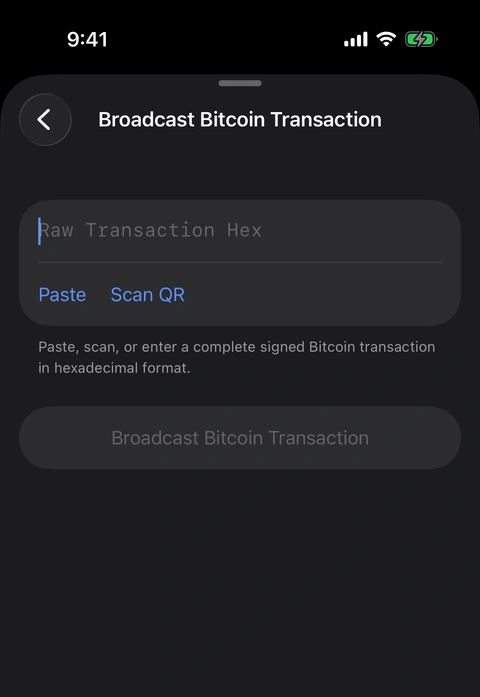
Settings → Tools → Broadcast Bitcoin Transaction. This screenshot contains no signed transaction.
The broadcaster accepts complete signed Bitcoin transaction hex, either pasted, entered, or scanned from a supported QR. It parses the transaction and displays its transaction ID before submission. After successful submission, the screen offers the resulting reference and an explorer link.
This tool is useful when a transaction has already been prepared and signed in a compatible workflow. It does not create the payment from a recipient and amount, and it is not a general PSBT signing interface.
Broadcasting is consequential: someone with a valid signed transaction can submit it. Review its destinations and amounts in the software that prepared it before using this tool. Successful submission means a broadcaster accepted the transaction; it does not mean a miner has confirmed it. The illustration shows an empty input. No transaction was broadcast for this guide.
14. Import formats determine which Bitcoin controls exist
“Import a wallet” can mean restoring a seed tree, importing one private key, or reconstructing a supported collection of scripts. Those are different scopes, even if all three eventually show a BTC balance.
Recovery phrases and optional passphrases
For a BIP-39 wallet, use Add Another Wallet → Import an Existing Wallet → Recovery Phrase. Enter the original words in their original order and provide the exact BIP-39 passphrase if that wallet used one. The passphrase is separate from the app-lock passcode.
A different passphrase derives a different wallet, often one that appears empty. The app cannot infer the intended passphrase from the recovery words. This is part of BIP-39’s seed derivation, not an error that a balance refresh can repair. BIP39 specification
Recognized Electrum seed types follow their own derivation rules. Aperture handles the supported Electrum seed family rather than treating every Electrum phrase as a BIP-39 phrase with all six ordinary families. A similar-looking word list does not establish format compatibility. Electrum’s seed-version documentation
Private keys, extended keys, and descriptors
The Bitcoin private-key route supports the formats listed in the app: 64-character hexadecimal private keys, WIF, BIP38-encrypted keys, supported extended private keys, Electrum-style key expressions, mini private keys, and supported private descriptors such as pkh(), wpkh(), sh(wpkh()), and tr(). Encrypted material requires its correct password.
Preserve the original export and understand the route you choose. In the direct extended-key entry path reviewed here, Aperture derives a particular child private key; that is not the same operation as importing a ranged descriptor or restoring a full seed wallet. Do not assume that pasting an xprv, yprv, or zprv restores every account and address controlled by the original extended key.
An ordinary single-key import also does not acquire a complete BIP-39 address tree or the same arbitrary-index controls. Its available address representations depend on the imported key and its format, including whether a WIF specifies a compressed public key.
Wallet files and recovery-specific routes
Under Bitcoin private-key import, Import a File handles supported wallet files and key collections. The parser includes supported Bitcoin Core backups, Electrum wallet files, descriptor/key collections, and compatible text, JSON, and CSV exports. Encrypted files need their password. Mainnet, supported signing-policy, size, and completeness checks still apply; “Bitcoin Core backup” is not a claim that every historical wallet configuration is supported. Public-only data cannot restore private spending authority, and unsupported multisignature or script policies may be rejected.
Muun has a separate recovery route using its Emergency Kit or encrypted recovery keys together with the Recovery Code. Its recovered scope is Bitcoin; a Muun encrypted key is not a standalone WIF or a normal BIP-39 recovery phrase. Follow that dedicated route rather than forcing the material into the wrong field. Muun’s recovery documentation
For every import, verify expected receiving addresses and discovered history before treating the result as a complete recovery. Acceptance of a format proves less than restoration of the particular funds you expect.
15. Backups and supporting recovery tools
Generating more addresses does not require a new BIP-39 recovery phrase: the deterministic tree comes from the same seed. But the information needed to find the right part of that tree still matters. Preserve any passphrase, unusual derivation context, and distant-index usage alongside the appropriate recovery plan.
Aperture also provides encrypted iCloud backup and supported device-transfer workflows. Use the app’s backup status and verification steps for the specific wallet rather than assuming that seeing a cloud option means a current, restorable backup exists. Our backup and restore guide explains that workflow separately.
For users who deliberately supply their own source randomness, Create Entropy Manually records physical outcomes and turns the accumulated bits into BIP-39 recovery material. That concerns the origin of the seed; choosing a high Bitcoin address index does not add entropy or improve a weak seed. Record genuine independent random outcomes and respect the live input warnings.
The Find Last Recovery Word tool in Settings → Tools accepts the first 11, 14, 17, 20, or 23 BIP-39 words in order and computes checksum-valid final-word candidates locally. Several candidates can be valid. It cannot tell you which candidate was your original word merely from the checksum, and it is not a general missing-phrase recovery service. Keep even an incomplete recovery phrase private.
16. If the Bitcoin balance is not what you expected
Work through the scope before assuming the funds disappeared:
Check the wallet and network. Bitcoin mainnet is distinct from wrapped BTC tokens and other Bitcoin-family chains.
Check the recovery format. A BIP-39 phrase, Electrum seed, single WIF, extended-key entry, wallet-file import, and Muun recovery do not imply the same address set.
Check the passphrase. The exact original BIP-39 passphrase is required for a wallet that used one.
Check the derivation family. Compare the original path, including BRD compatibility paths when relevant, rather than relying only on an address prefix.
Check the branch and index. Receive and change are separate; a distant address may be outside ordinary discovery. Generation alone does not prove it has been scanned.
Check discovery status. Use Refresh Wallet State in Bitcoin Settings and inspect Silent Payments’ scan progress if that feature was used. A refresh does not override the range limitation described above.
Check the actual transaction. Verify its network, destination, output, and confirmation status. If you seek help, share only the minimum public transaction information you are comfortable disclosing—never a phrase, passphrase, private key, or backup password.
The control that matters
For daily use, you can leave address selection automatic, choose a receiving format the sender supports, inspect the fee, and keep a verified recovery backup. The deeper settings are there when a concrete question requires them.
When that question arrives, you should be able to answer it precisely: this family, this branch, this index, this output, this recovery scope.
That is the value of making Bitcoin’s structure visible. You can see what the wallet is doing, choose deliberately when you need to, and recognize when a control changes less—or more—than its label first suggests.
Product behavior was reviewed against the current Aperture implementation on September 11, 2026. Address generation, manual selection, and return to automatic selection were exercised in an empty simulator wallet. The guide explains the sending and recovery implementations without broadcasting a payment or publishing secret material. It is product documentation, not an independent security audit.