A token can call itself anything. Its name can imitate a familiar project. Its ticker can reuse three or four trusted letters. Its logo can be copied pixel for pixel. None of those labels tells your wallet which on-chain asset you are looking at.
The durable identity is the combination of network and token address: an EVM or TRON contract address on a specific mainnet, or a Solana mint address on Solana mainnet. Aperture makes you choose that network first, validates the complete address, and only then resolves the display metadata. The order is deliberate: identity before presentation.
Trust the mainnet-and-address pair. Treat the name, symbol, logo, decimals, and price as information to review—not proof of authenticity.
Why a ticker is not an identity
On ERC-20-style tokens, functions such as name, symbol, and decimals exist so interfaces can display a contract in human-friendly form. The Ethereum ERC-20 walkthrough describes them as user-interface helpers. A new contract can return the same name and symbol as an established token. The blockchain does not reserve a ticker globally.
That creates four common traps:
Copied symbol. A malicious token can return “USDC,” “ENS,” or another familiar ticker without being the asset you intended.
Copied name and artwork. Polished metadata can make the wrong contract look convincing in a list.
Right address, wrong network. The same 0x string on Ethereum and Base refers to two separate chain contexts. A valid address shape does not select the chain for you.
Right contract, misleading search result. A sponsored result, direct message, or copied social post can replace one address with another while keeping every visible label familiar.
For EVM assets, Aperture canonicalizes the identity as the selected network plus a lowercased 0x contract address. Solana mint addresses remain case-sensitive. TRON contract addresses use the mainnet Base58Check form. Those formats differ, but the rule does not: the address is meaningful only inside the network you selected.
What “adding a token” actually does
Adding a custom token tells Aperture to track an existing on-chain asset for the selected wallet account. It does not deploy a token, create a blockchain account, receive funds, import a private key, approve a spender, sign a message, or move value. A saved token with no balance simply appears with a zero balance.
Aperture stores the asset under its network-and-address identity, enables it for the selected account, pins it for visibility, and schedules a balance refresh. If the same identity is added again, Aperture updates and re-enables the existing record instead of trusting a changed name or symbol as a second asset.
Before you open Aperture: verify at the source
Use a primary source controlled by the issuer or protocol. For this walkthrough, the public example is the ENS governance token on Ethereum mainnet. ENS states that token.ensdao.eth is its official governance token, and official ENS DAO material identifies the token contract as 0xC18360217D8F7Ab5E7c516566761Ea12Ce7F9D72. The contract address is public; it is not a wallet secret.
Then cross-check the exact string in a reputable explorer for the same network. Confirm all 42 EVM characters, including the 0x prefix. Do not compare only the first and last four characters. Never take a contract address from a token sent unexpectedly to your wallet, a reply below a social post, a support direct message, or an advertisement.
Source one: the project or issuer’s official documentation.
Source two: a reputable block explorer opened independently for the chosen mainnet.
Final comparison: network name and every address character—not the token logo or ticker.
1. Open Manage Your Assets
From Aperture’s wallet home, open the complete asset list, then use the settings control to reach Manage Your Assets. The add control in the upper-right starts the custom-token flow.
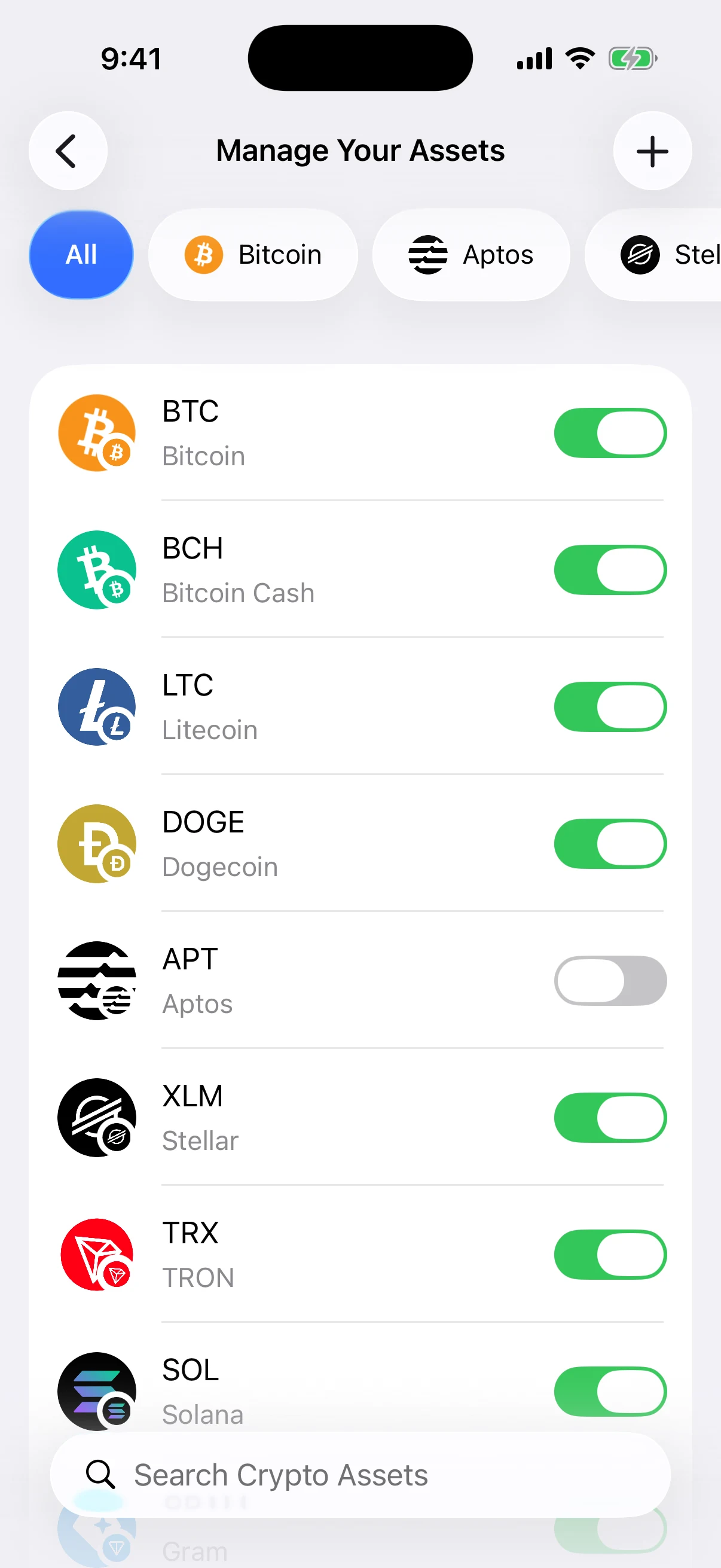
Real Aperture 2.40.12 output from the isolated iOS Simulator. The article wallet contained no funds, and no recovery phrase, private key, passcode, or funded address appears in any screenshot.
2. Choose the network before the token
Aperture does not ask for a ticker and then guess a network. It asks for the chain first. In the production build used here, custom-token lookup is available on Ethereum, BNB Smart Chain, Arbitrum, Base, Polygon, Optimism, Avalanche, Gnosis, Linea, Scroll, Taiko, Telos, X Layer, Solana, and TRON—all mainnets.
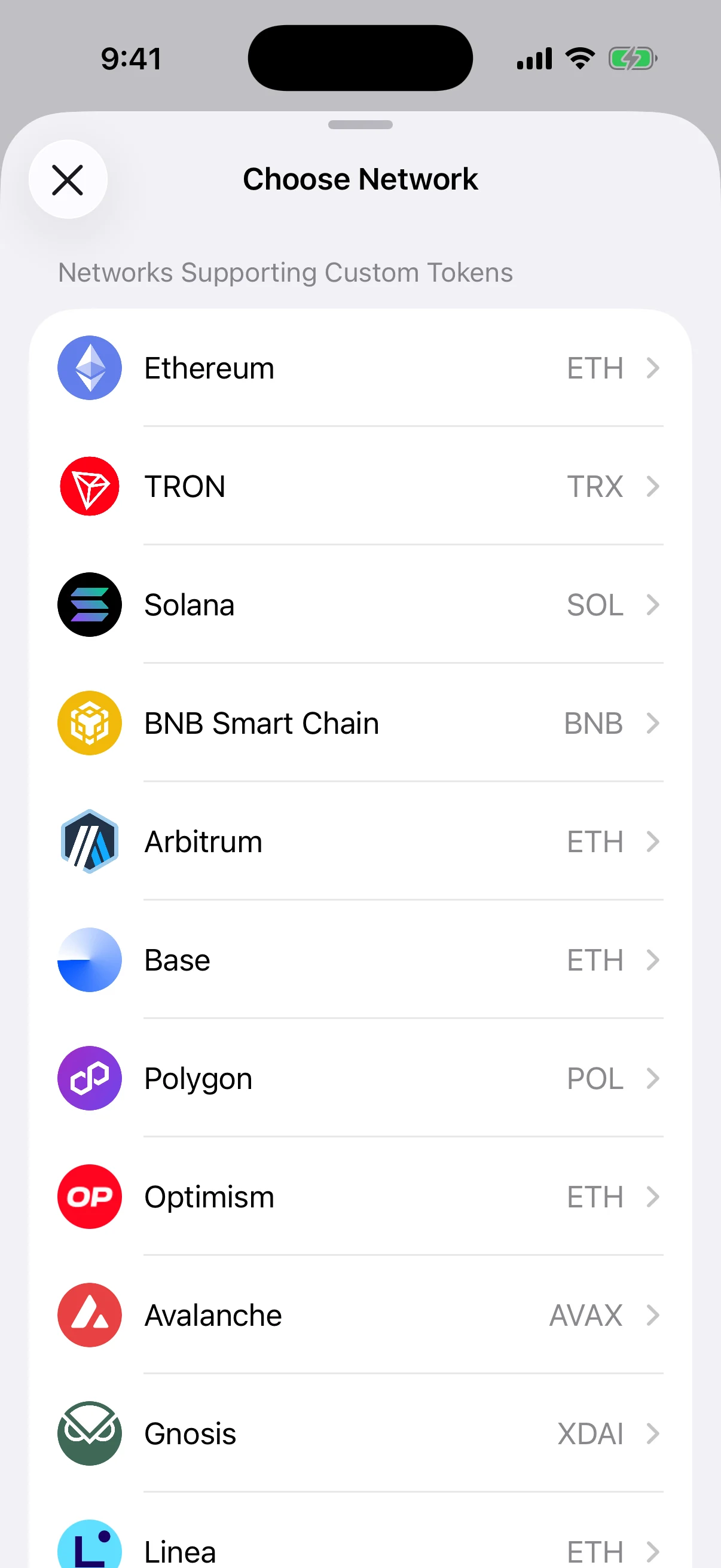
Real production network picker. Ethereum is correct for the official ENS token used in this walkthrough. A similarly named token on another chain would be a different asset identity.
This first choice prevents a dangerous shortcut: treating “0x…” as sufficient context. Multiple EVM networks share the same address format, but they do not share one asset registry.
3. Enter or scan the complete token address
After choosing Ethereum, Aperture accepts a complete 0x-prefixed address. You can paste it, type it with the ASCII keyboard, or scan a QR code and review the recognized network and address before using it. Aperture filters the field to the expected address alphabet and length; an EVM address must contain 40 hexadecimal characters after 0x, and the zero address is rejected.
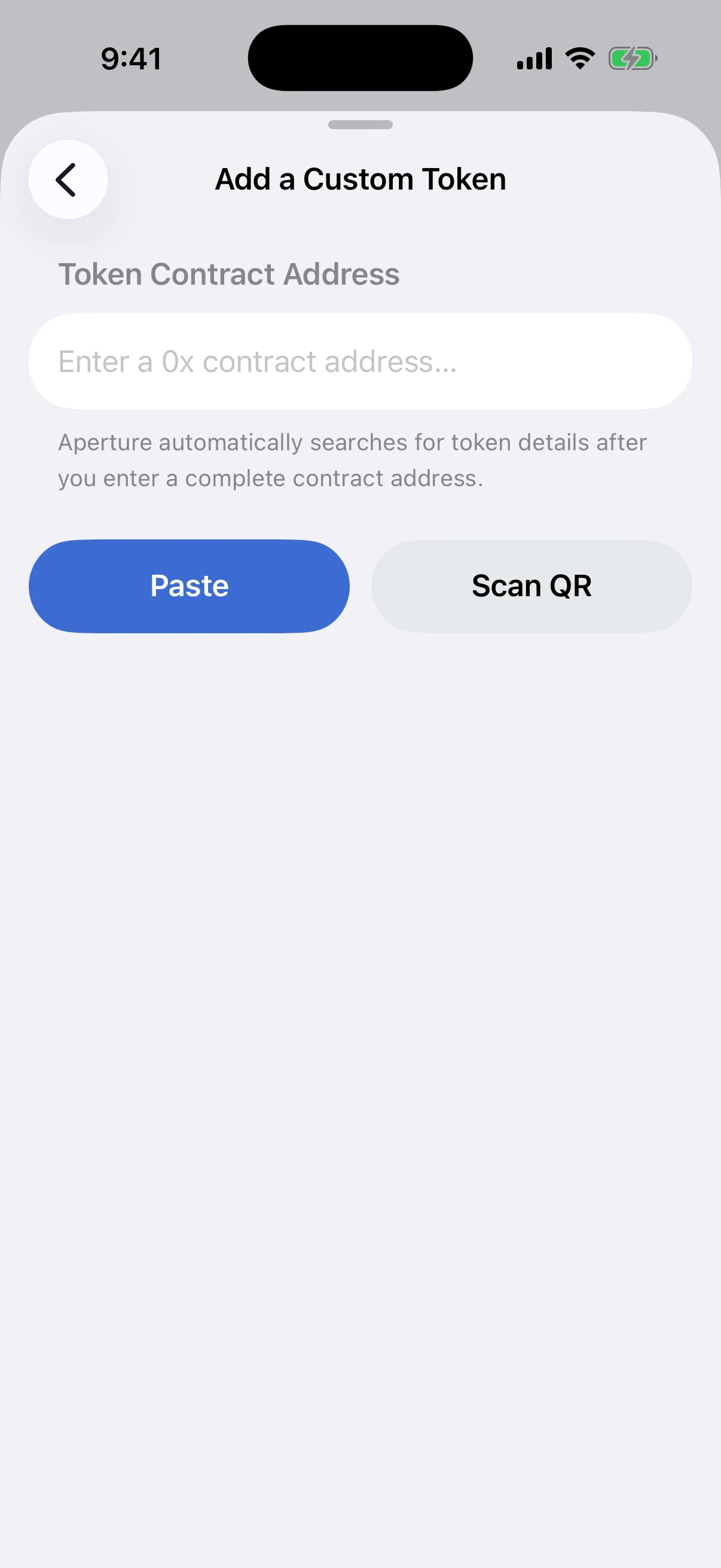
Real empty contract-entry screen. Aperture begins the lookup only after the address is complete, so a partial string is not treated as a token identity.
Solana follows its own rules: the mint must be a valid, case-sensitive Solana address. TRON requires a valid Base58Check contract address on TRON mainnet. Never “fix” capitalization on a Solana mint by hand, and never convert an address from one network’s format into another to make a form accept it.
4. Read the result in the right order
When the address is complete, Aperture performs a chain-scoped lookup. The review card is designed to be read from strongest identity evidence to weakest presentation evidence:
Network. Is this the exact mainnet named by the issuer?
Contract or mint address. Does every character match the primary source?
Decimal places. Does the token’s unit precision match the expected on-chain definition?
Name and symbol. Do they look plausible only after the identity pair has matched?
Logo and market price. Are they helpful presentation data without being treated as authentication?
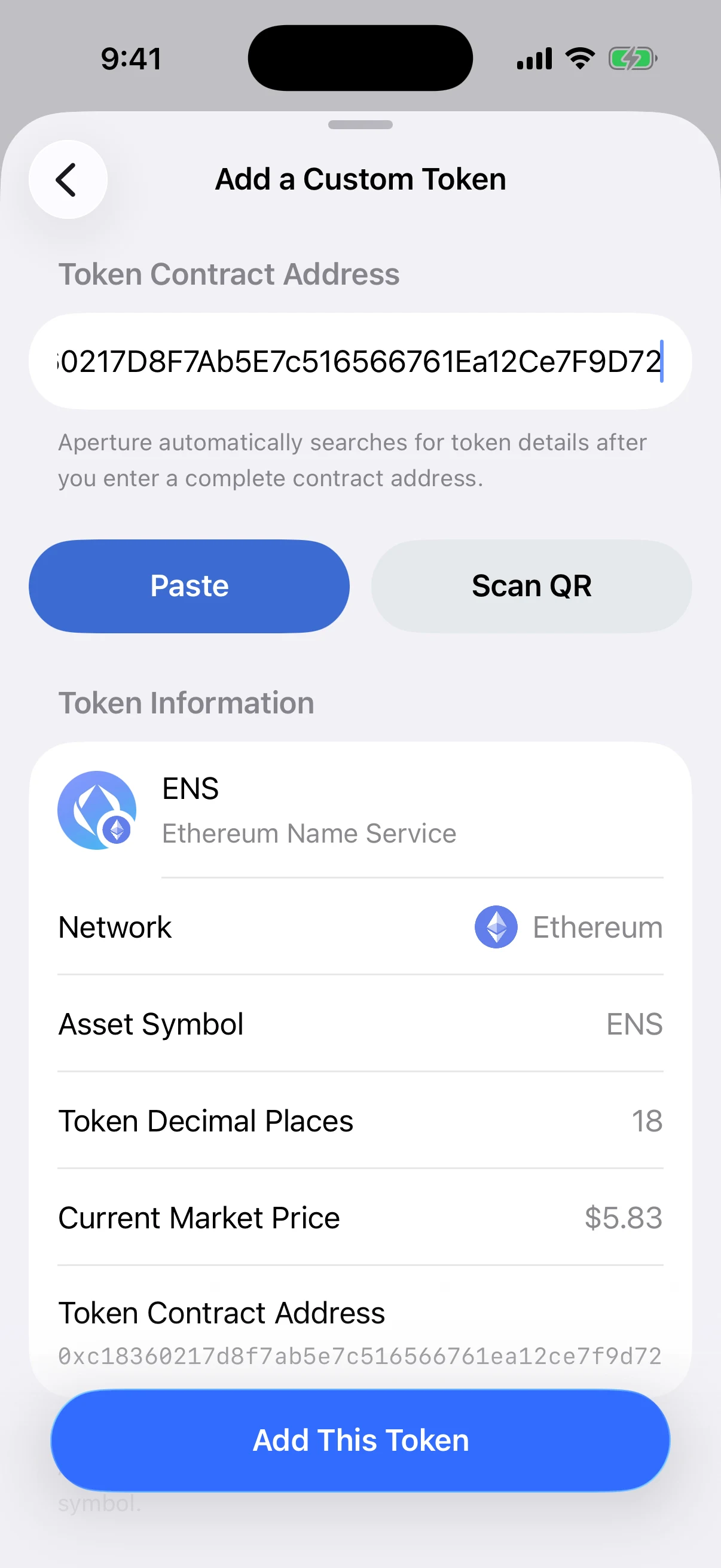
Real live lookup of the official ENS token on Ethereum. Aperture normalized the stored identity to 0xc18360217d8f7ab5e7c516566761ea12ce7f9d72 and returned the ENS name, ENS symbol, 18 decimal places, and the market price available at capture time. Prices change; the contract identity does not.
The warning under the card is the central rule of the flow: confirm the network and token address before saving, because anyone can create a token with a misleading name or symbol.
What Aperture validates behind the review card
Aperture applies network-specific checks rather than flattening every token into a ticker search:
EVM mainnets: the address is normalized, validated, rejected if it is the zero address, and looked up only inside the selected chain. The provider result must match both that chain and contract. Aperture requires a usable bounded name, symbol, and decimal value before it will offer the save action.
Solana mainnet: Aperture validates the mint account, compares the on-chain decimals with eligible metadata, and blocks results marked suspicious, denylisted, or hard-denied by the wallet safety policy. For an overview of mint identity and decimals, see Solana Token Basics.
TRON mainnet: Aperture validates the Base58Check contract address, reads the token name, symbol, and decimals through chain RPC calls, and applies the same hard-deny safety boundary. The metadata functions mirror the display-oriented fields described in the TRC-20 contract example.
A malformed response does not become a generic “connection” story. Aperture distinguishes invalid addresses, missing token metadata, unsafe tokens, unsupported networks, provider errors, and unreadable responses so the result remains actionable.
Decimals control display math—not legitimacy
A token balance is stored on-chain as an integer. Decimals tell a wallet where to place the decimal point for human display. With 18 decimals, an atomic balance of 1,000,000,000,000,000,000 displays as one token. With 6 decimals, 1,000,000 displays as one token.
Decimals do not prove value, backing, redeemability, ownership, or issuer identity. A fake token can choose the same decimals as a real one. Aperture requires a usable decimal value because incorrect precision would display the balance incorrectly—but the network-and-address pair still determines which asset it is.
A logo is a convenience, never a credential
Aperture resolves token artwork by blockchain plus normalized contract or mint address. Bundled catalog artwork is authoritative for known identities. For an EVM custom token absent from that catalog, a provider thumbnail may be used; Solana and TRON custom tokens without approved catalog artwork use a neutral fallback. Every logo is shown as a circular crop.
That hierarchy avoids selecting artwork from a ticker or display name, but no artwork source changes the verification rule. A perfect logo beside the wrong contract is still the wrong token. A neutral fallback beside the right verified contract is still the right identity.
The same address on another network is not the same lookup
To make the network boundary visible, we entered the official ENS Ethereum contract while Base was selected. At capture time, Aperture did not quietly reuse the Ethereum metadata. The chain-scoped lookup returned “Token Could Not Be Found.”
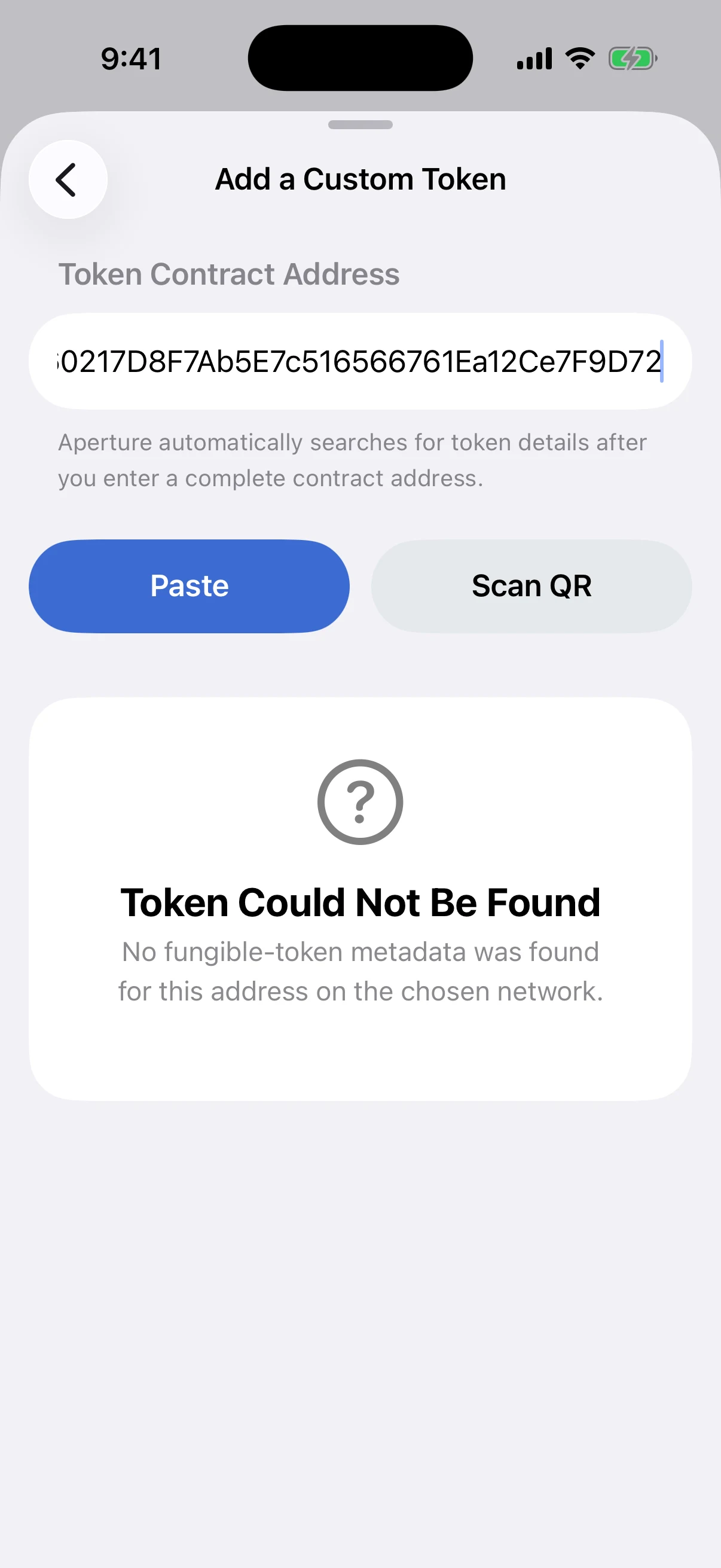
Real production result, not a mock error. The address has a valid EVM shape, but Base is the wrong context for this official Ethereum token identity.
A different contract could exist at the same 0x string on another EVM chain. If it did, it would still be that chain’s contract—not automatic proof that it represents the Ethereum asset. Always verify the network and address together.
5. Add the verified identity
Only after the network and full address match should you tap Add This Token. Aperture saves the token under its canonical identity and enables it in Manage Your Assets. The ENS example appears with an Ethereum network badge and a zero balance in the empty article wallet.
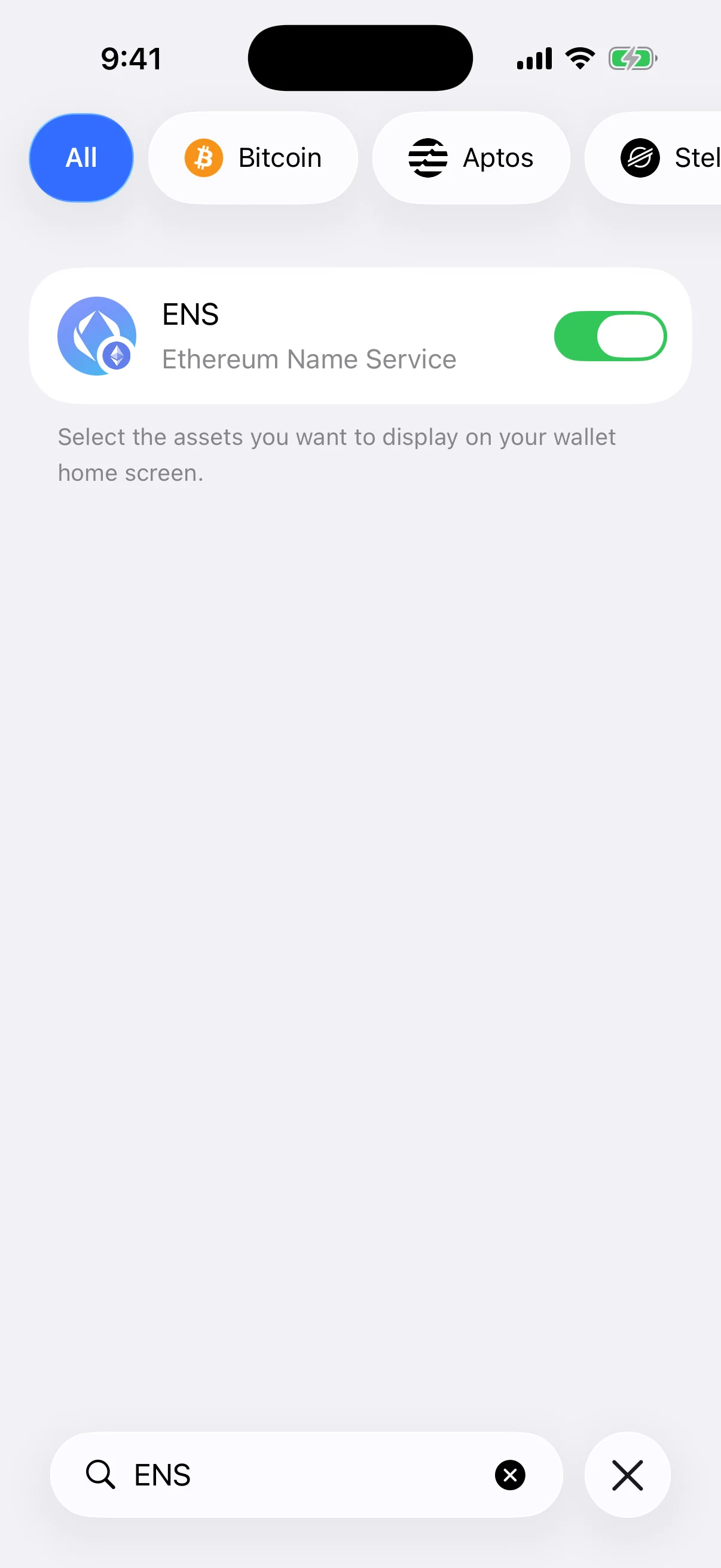
Real post-save state. The temporary ENS entry was hidden again after capture, and the Simulator was returned to the original wallet home screen.
If a balance exists for the selected wallet account, the next synchronization can populate it. Adding the token does not make an unsupported balance appear, manufacture a price, or change anything on-chain. It changes what Aperture tracks and presents locally.
When a price is missing
“Currently Unavailable” means Aperture did not obtain a current market quote for that exact asset identity. It does not mean the token is worthless, and a displayed price does not mean the token is safe. Price coverage, liquidity, and authenticity are separate questions.
Never substitute the price for the contract check. Scam tokens can advertise fabricated values, and illiquid markets can produce quotes that cannot be realized. Verify identity first; evaluate the asset and market separately.
What to do with an unexpected token
A token can be sent to a public address without your permission. Its presence is not a gift you must claim and not proof that the project is legitimate. Do not visit a URL embedded in its name, follow instructions in its symbol, connect to an unknown site, sign an approval, or send another asset to “unlock” it.
If the asset is irrelevant or suspicious, leave it hidden. Adding or displaying a token is not required to preserve the blockchain balance: the chain already records it. The dangerous step is usually not seeing the token—it is interacting with an untrusted contract or website because the token told you to.
A safe custom-token checklist
Name the mainnet first. Ethereum, Base, Solana, TRON, and every other supported network are separate identity scopes.
Get the address from a primary source. Use the issuer or protocol’s official documentation, not a search ad, direct message, or token list copied into a post.
Cross-check independently. Open a reputable explorer for that exact network and compare every address character.
Choose the network in Aperture. Do not let a shared 0x format tempt you into assuming the chain.
Enter or scan the complete address. Review the recognized value before the lookup.
Read the result in identity order. Network, address, decimals, then name, symbol, logo, and price.
Stop on any mismatch. Do not “try another network” until a familiar name appears. Return to the primary source instead.
Add only what you intend to track. Saving changes local tracking; it does not endorse the token or authorize a transaction.
Questions people ask
Can two tokens have the same symbol? Yes. Symbols are display metadata and are not globally unique. Two unrelated contracts can both return the same ticker, even on the same network.
Can the same contract address appear on two EVM networks? Yes. EVM networks share an address format, but each network has its own state. The chain plus address is the identity; the address string alone is incomplete.
Does capitalization matter? Aperture accepts EVM hexadecimal input and stores the normalized lowercase identity. Solana mint addresses are case-sensitive and must retain their exact capitalization. TRON uses its Base58Check mainnet address format.
Does a correct name and logo mean the token is official? No. Both can be copied. Verify the exact network and contract or mint address against a primary source.
Does adding a token give its contract permission to spend? No. Adding is local tracking. Spending permission requires a separate signed approval or transaction. Never sign one merely because the token now appears in the wallet.
Why did Aperture reject a complete address? It may be malformed for that chain, the zero address, absent from the selected network’s fungible-token metadata, inconsistent with on-chain decimals, blocked by the safety policy, or unavailable because a provider returned a concrete error.
Can I hide a token without losing it? Yes. Visibility is local presentation. Hiding an asset does not transfer, burn, or remove its on-chain balance.
Identity first, metadata second
Custom-token support is useful because blockchains are open: a wallet should not need a software update before it can recognize every legitimate asset. That openness is also why a familiar ticker can never be the trust anchor. Anyone can publish a label. Only the selected chain and exact contract or mint address identify the asset Aperture will track.
Verify those two facts outside the wallet, reproduce them inside Aperture, and then use the fetched name, symbol, decimals, logo, and price as a review surface. The interface becomes clearer, the risk becomes explicit, and “Add a Custom Token” stops being a search box for names. It becomes what it should be: a precise request to follow one public on-chain identity.
A familiar symbol can be copied. A verified network-and-address pair is specific.
Continue learning
To understand how Aperture separates accounts by chain, read One Wallet, Many Mainnets: How Aperture Keeps Accounts and Networks Separate. For the device and key boundary behind every tracked asset, continue with What Never Leaves Your iPhone: Aperture’s Self-Custody Security Model. When you are ready to receive, use Receive Crypto Safely: Network, Address, QR Code, and Requested Amounts to keep the same network-first discipline all the way to the sender.