

A wallet starts small: one balance, a few assets, two obvious buttons. Then it grows. More networks arrive. Token names repeat across chains. Transaction history becomes a stream of hashes, counterparties, methods, notes, and statuses. Settings collect in their own hierarchy. A second wallet appears. The thing you remember is no longer where an item lives—it is what the item is called.
Aperture Universal Search turns that memory into navigation. One native search field on Wallet Home looks across actions, settings, managed wallets, supported mainnets, assets, available prices, and the selected wallet’s transaction history. Results are grouped by meaning, ranked locally, and wired to the real destination. Search for a task and perform it. Search for an asset and open it. Search for a network and see its assets. Search for a transaction clue and inspect the matching activity.
You remember the intent. Aperture finds the route.
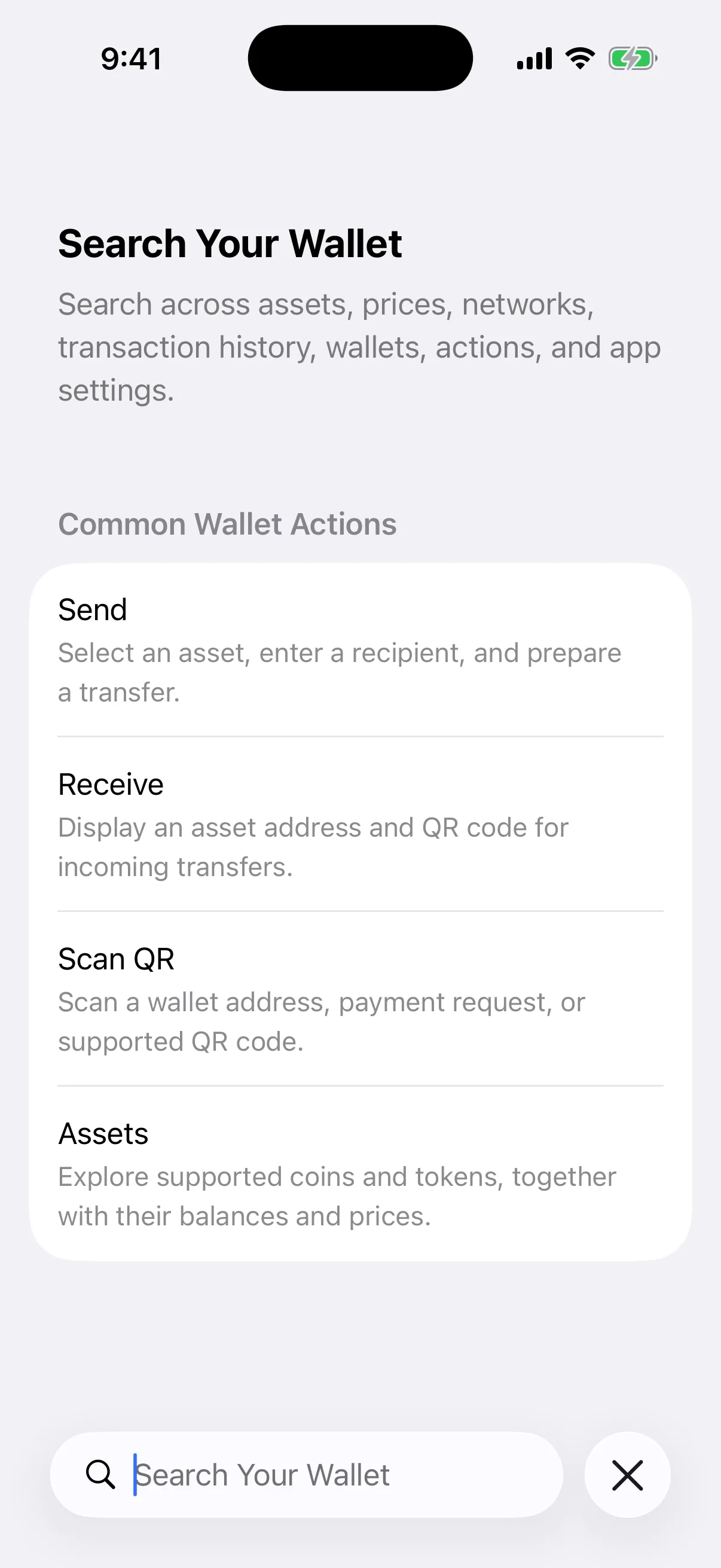
Fresh capture from Aperture 2.40.12 in the iOS Simulator. The empty article-only wallet shows real start suggestions—Send, Receive, Scan QR, and Assets. Every app image in this article is a real Simulator capture containing public data only; no secret, funded wallet, fabricated transaction, signing, or broadcast was used.
“Universal” means one query, several kinds of answer
Most wallet search boxes answer one narrow question: which token matches this text? Aperture treats search as a cross-product command surface. The same query can produce several independently labeled sections:
Wallet actions and settings. Send, Receive, Scan QR, Assets, Manage Assets, Activity, Wallets, Security, Appearance, Language, Currency, Notifications, About, Privacy, Terms, Reset, and related settings entries.
Wallet management. Every active managed wallet can be found by name, public wallet address, or wallet type, with the current wallet identified separately from a wallet you can switch to.
Blockchain networks. All supported mainnets are indexed by display name, internal identity, blockchain family, and useful network aliases.
Assets and market prices. Native coins and tokens can match by name, symbol, qualified network identity, contract address, and available numeric balance, fiat-value, or unit-price data.
Complete transaction history. Eligible activity in the selected wallet can match hashes, addresses, direction, status, methods, display details, asset identity, network identity, time text, and your local transaction note.
The sections matter. A query like “security” can legitimately describe a Settings destination and an asset name. Aperture does not flatten them into an ambiguous list; it labels their domains so you can choose with context.
Open search and the useful defaults are already there
On iPhone, the native search control lives in the bottom toolbar. On iPad, the same search affordance moves to the top trailing toolbar position. Before you type, Aperture presents four high-frequency routes in a native list: Send, Receive, Scan QR, and Assets. If the portfolio contains funded assets, up to four of those assets can appear as suggestions too.
This blank-query state is intentional. Search is still useful when the exact wording has not arrived yet. It gives the thumb a short path to the next action without adding a second custom dashboard or a parallel navigation system.
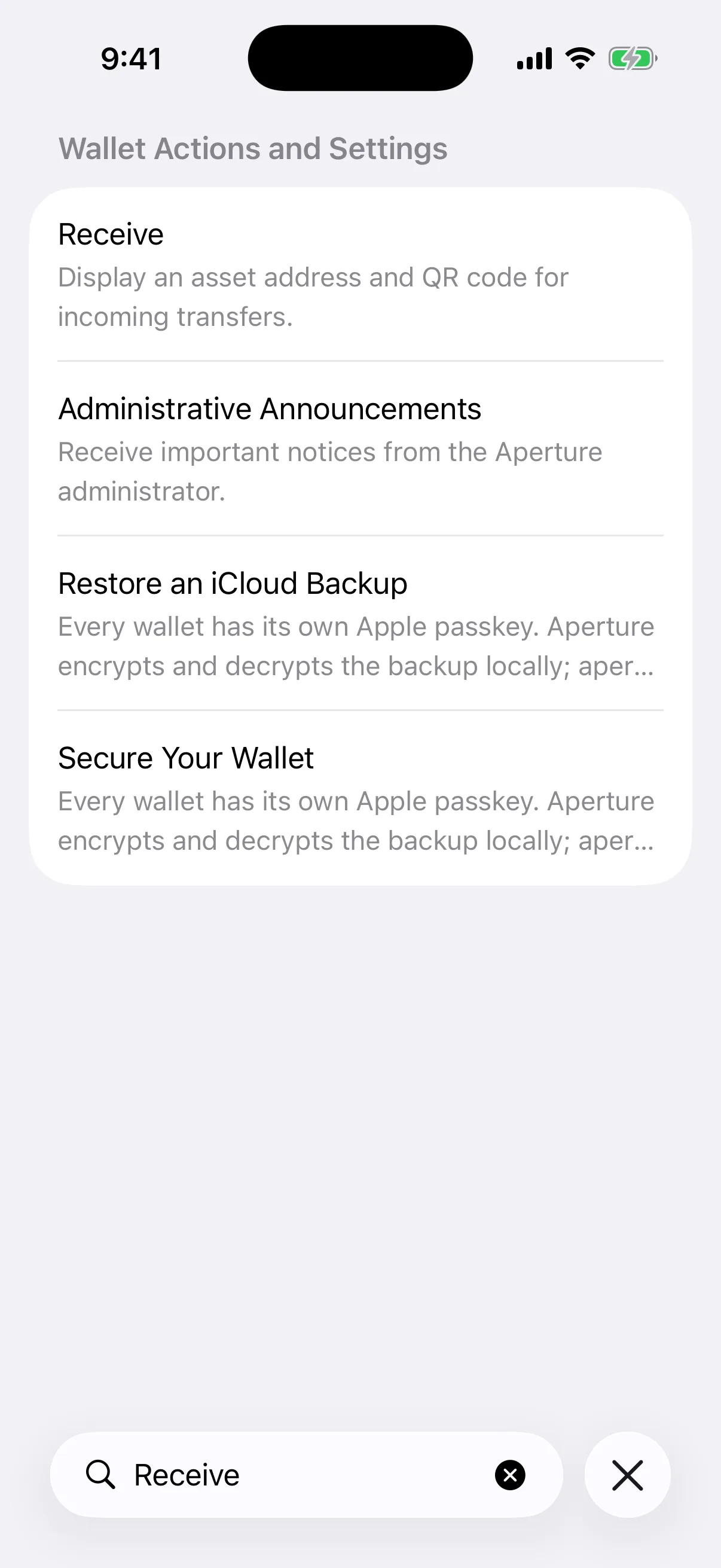
Real Simulator output for “Receive.” The exact Receive action ranks first. Related settings whose explanatory text contains the same intent follow in the same clearly labeled section.
The search request stays on the device
Universal Search does not send the typed query to an Aperture search server. When the field opens, the app builds an in-memory index from the wallet content already available to the Home presentation: actions, localized settings copy, managed wallet metadata, supported network metadata, and the wallet’s searchable asset catalog. Transaction matching runs against the centralized on-device GRDB WalletDatabase.
That distinction is precise: prices, balances, assets, and blockchain history may have been synchronized from their normal providers before you search, but the act of typing and matching the query is local. There is no remote “universal search” endpoint receiving each character. Closing search clears the query from the Home view.
The search index is also demand-driven. Aperture does not keep rebuilding it while the search interface is closed. Presenting search activates observation of the current asset IDs, managed wallets, and reusable USD prices; changes to wallet content, wallet metadata, prices, the selected wallet, or the app language produce a new revision. Dismissing search stops that work.
Fast local matches and deep history run together
Each non-empty query launches two bounded jobs in parallel:
The in-memory index ranks actions, settings, wallets, networks, and assets. This keeps the interface responsive and avoids touching the transaction database for everything.
The transaction index uses SQLite FTS5 inside WalletDatabase to retrieve matching activity from enabled accounts belonging to the selected wallet.
The UI waits for a coherent result set, then presents the categories together. If transaction-history lookup fails, Aperture keeps the other local results and shows a specific history-unavailable message instead of replacing the whole search with a generic connectivity error. If the index is still being prepared, the screen uses a localized static state rather than a spinner or fabricated placeholder rows.
Ranking favors what you probably meant
Search text is trimmed, case-folded, and normalized. Exact titles rank first. A title beginning with the query ranks next, then a complete title word, followed by matches across the item’s broader searchable copy. In a multi-term query, every term must be represented by a whole word, a word prefix, or contained text. Ties fall back to title order for deterministic results.
This is deliberate lexical search, not a cloud language model guessing intent. Prefixes work well—“Bitco” can match Bitcoin—and accents are folded for transaction search, but an unrelated typo is not promised to be corrected. The result is predictable: the same local data and query produce the same ordering.
Result sets are bounded too: up to 20 actions, 20 wallets, every supported network match, 60 asset matches, and 100 display-eligible transactions. Transaction candidate retrieval is capped before the app applies its normal visibility policy. Large catalogs remain searchable without turning one query into an unbounded scan.
A network name can reveal both the chain and its assets
Search for Bitcoin and Aperture does not pretend every matching object is the same Bitcoin. In the real app, the query returns Bitcoin and Bitcoin Cash as blockchain networks, the native BTC asset on Bitcoin, and assets named Bitcoin on other chains. Each asset row carries its symbol and network; each logo is resolved from the official network artwork or identity-qualified asset catalog.
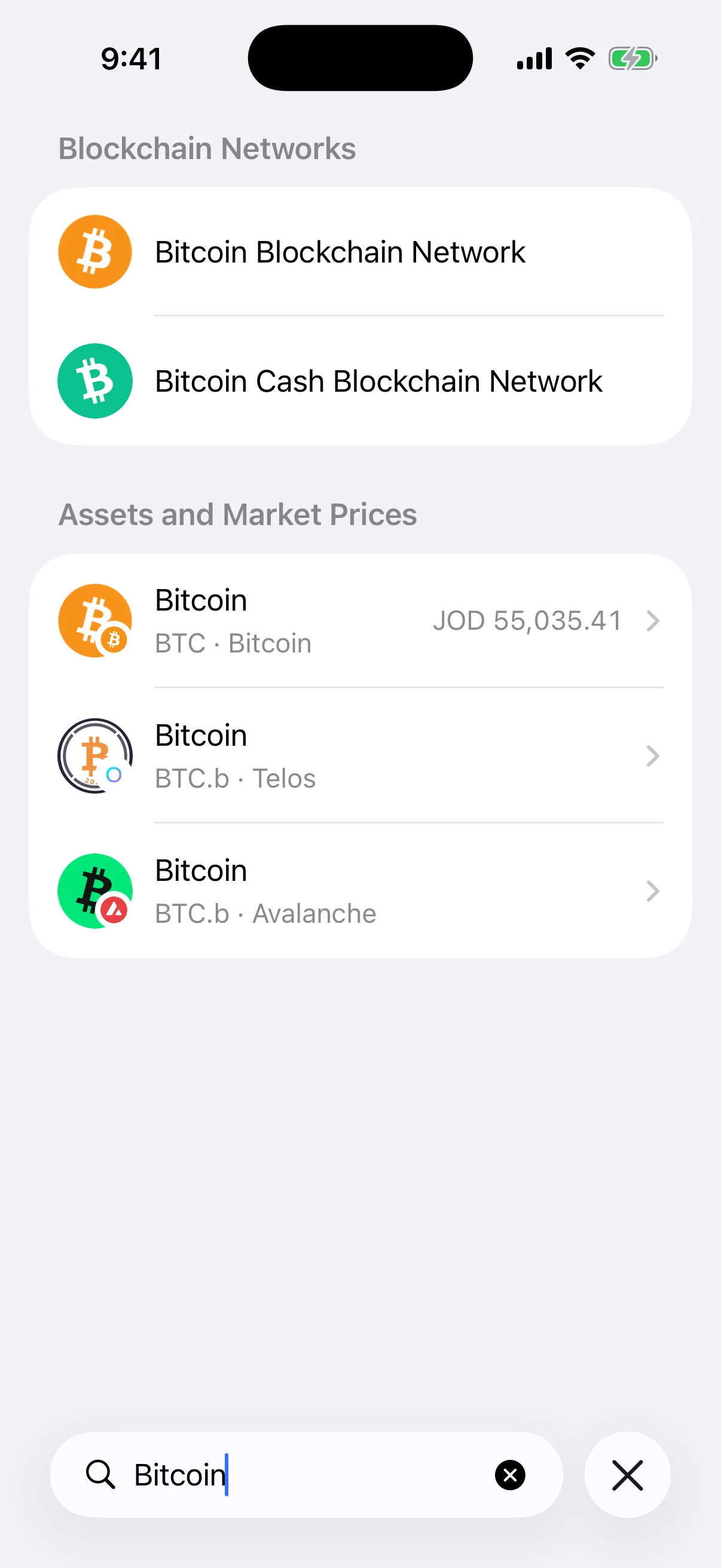
Fresh Aperture 2.40.12 Simulator capture. The article-only wallet returns two mainnet records plus identity-qualified Bitcoin assets. The visible JOD value is a real available market-price presentation at capture time, not an invented balance.
This identity model prevents a dangerous shortcut: a ticker or display name alone is not enough to choose a token. Aperture’s asset search is backed by blockchain plus normalized contract identity where a contract exists. A query can therefore include a symbol and network—such as “USDT Ethereum”—or an exact contract address to narrow the result.
A hidden Home asset is still discoverable in search. Finding or opening it does not silently change its visibility preference. Search answers “does this wallet know this asset?” while the Home setting independently answers “should this asset appear in the primary portfolio list?”
Network results are navigation, not decoration
Every supported network is indexed with its localized name, stable network ID, blockchain family, and aliases. Selecting a network result closes search and opens the complete asset list already filtered to that mainnet. There is no testnet switch hiding behind the result: Aperture’s supported wallet surface is mainnet-only.
That direct route is useful when one symbol spans many chains. Search can first identify the network, then place you in a list where every remaining asset shares that network context. Read One Wallet, Many Mainnets: How Aperture Keeps Accounts and Networks Separate for the account and address boundaries behind those labels.
Wallet names, public addresses, and mainnet aliases share one field
Managed wallets are indexed by name, public address, and wallet kind: created, recovery-phrase import, private-key import, watch-only, or hardware-backed where supported. The result row distinguishes the active wallet from one that can be made active, and selecting another wallet closes search before Aperture updates the selected wallet and reloads its presentation.
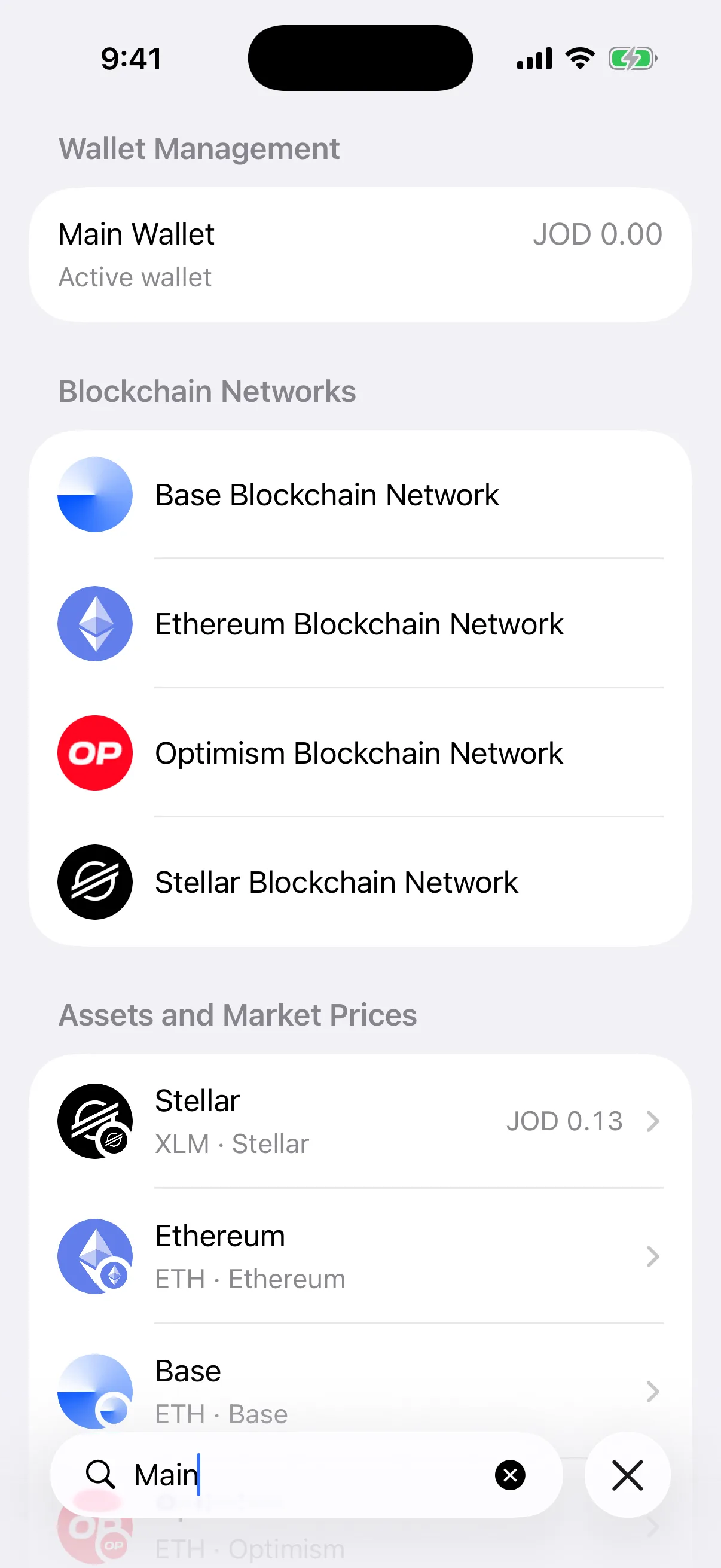
Real Simulator output for “Main.” It finds the active Main Wallet and networks whose aliases identify them as mainnets, then shows matching assets below. The wallet is empty and the displayed JOD 0.00 is real.
Wallet-address matching is useful when the recognizable part of a wallet is its public identity rather than its nickname. It does not expose recovery phrases or private keys because those secrets are not members of the search documents or the WalletDatabase.
Settings become destinations you can name
Deep settings are often remembered semantically: “Face ID,” “auto lock,” “language,” “notifications,” or “privacy screen.” Universal Search indexes both the localized setting title and its explanatory subtitle. Searching the thing you want can therefore find the screen even when the navigation hierarchy is not in memory.
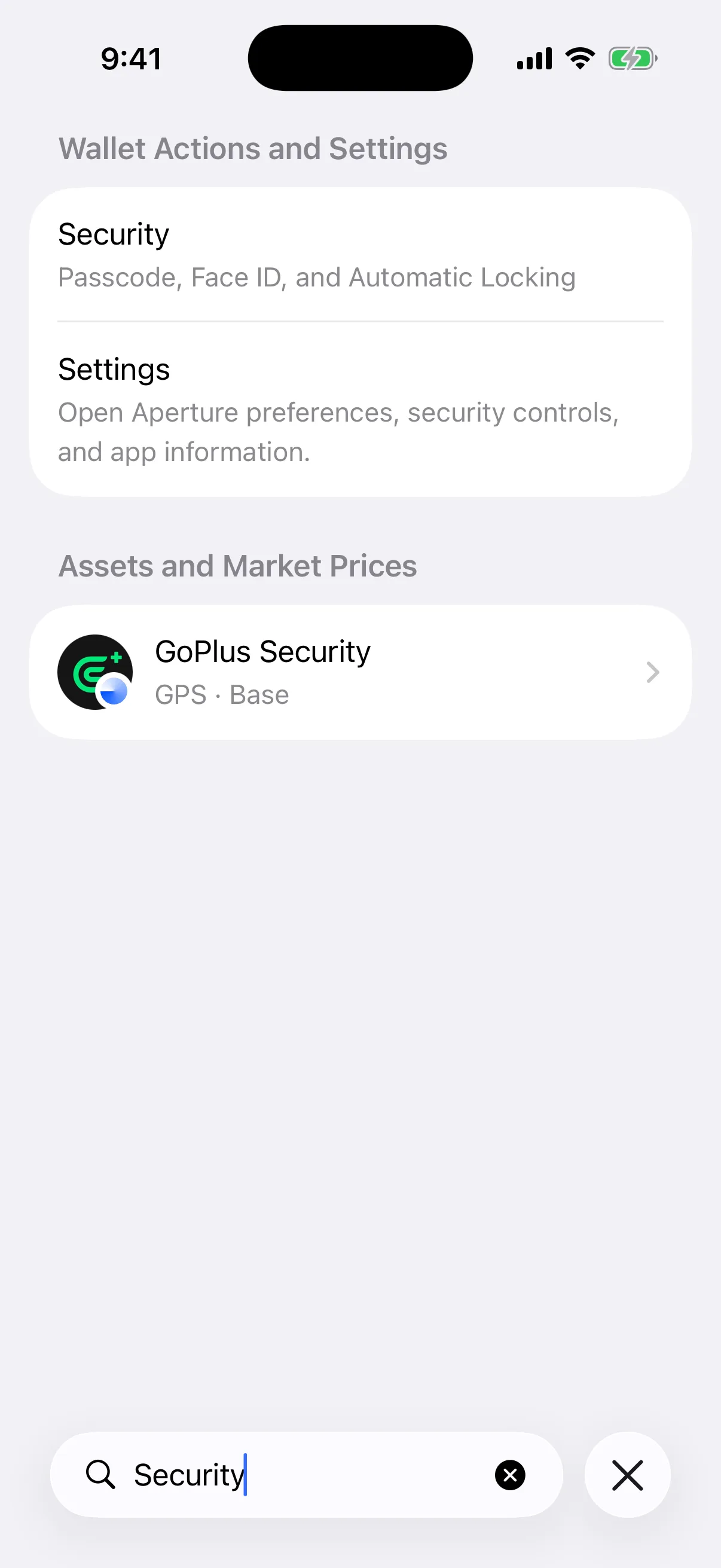
Real Simulator output for “Security.” The Security destination and Settings route are grouped above a Base asset whose real name also matches. The categories make the difference explicit.
Selecting a settings result dismisses search and presents the existing Settings flow at the dedicated route. Search does not reproduce the setting inline, bypass its normal screen, or add a new authentication gate. The destination keeps its own lifecycle, controls, platform protections, and navigation behavior.
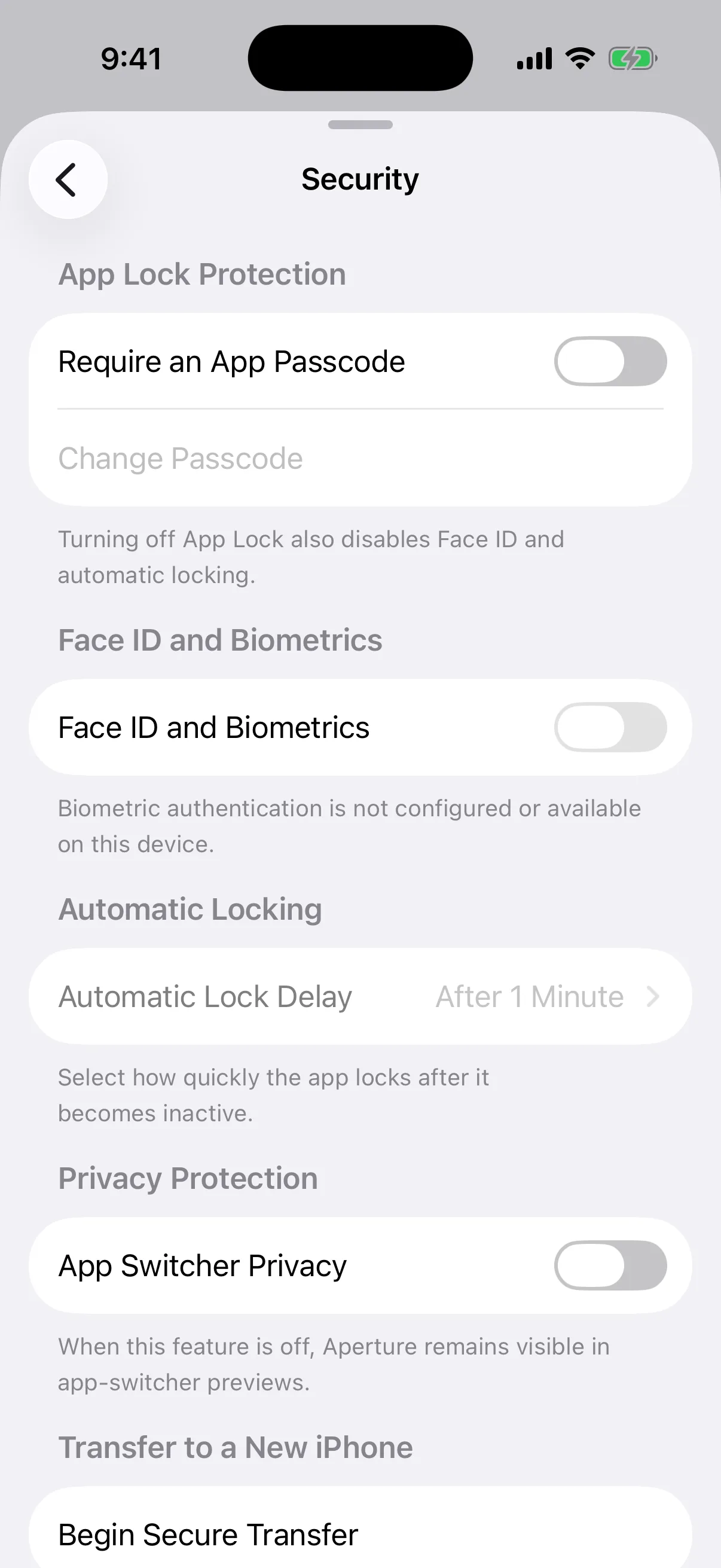
Real Aperture 2.40.12 Simulator capture after selecting Security from the search results. No setting was changed for this article.
Transaction search is broad—but deliberately not raw
Aperture maintains a dedicated FTS5 table for transaction discovery. Database triggers insert, update, or remove its search document when a transaction changes. Asset-identity, network-identity, and local-note updates refresh the affected records so search does not rely on a stale exported cache.
The searchable transaction document can include:
transaction hash, scoped to enabled accounts in the selected wallet;
from, to, and counterparty addresses;
asset name, symbol, contract address, and network identity;
incoming or outgoing direction, transaction kind, and current status;
decoded method name, user-facing detail, display time, and your local transaction note.
Raw calldata is intentionally not indexed. A test in Aperture’s production suite seeds a marker inside transaction calldata and verifies that Universal Search cannot retrieve it, while the transaction hash, counterparty, local note, and “Polygon POL” identity remain searchable. This keeps search focused on useful user-facing fields instead of turning opaque payload bytes into an accidental discovery surface.
History results are also scoped and filtered. Only enabled accounts belonging to the currently selected, non-archived wallet enter the query. Retrieved records must still pass Aperture’s transaction display-eligibility and visibility policies before they become rows. Search cannot resurrect activity the wallet intentionally excludes from every other screen.
Selecting a transaction opens the standard transaction-details screen. For the lifecycle behind those statuses, see Send Crypto Without Guesswork: From Recipient to Finality; for the cost fields you may encounter, see Where Crypto Network Fees Actually Go.
Search understands qualified assets and numeric clues
Asset lookup reuses Aperture’s discovery index instead of inventing a second ticker-only catalog. It can match names, symbols, network-qualified phrases, normalized contract addresses, and the network metadata already used throughout Send, Receive, and asset management. It also merges matches against available balance, fiat-value, and unit-price decimal text.
Numeric matching is a convenience, not an accounting query language. A displayed value may be converted into the user’s selected currency while underlying reusable price data is maintained in USD and stored losslessly as decimal text. Search is best used with a name, symbol, network, or contract when certainty matters. Aperture’s Currency Converter remains the purpose-built tool for comparing amounts across units.
Localization changes the index, not just the labels
Actions and settings are indexed from the current localized title and subtitle. The app language identifier is part of the index preparation request, so changing language causes the search documents to rebuild rather than leaving English-only keywords behind a translated interface. Network rows use localized display names, while symbols, contracts, public addresses, and useful technical aliases remain available as identity terms.
The interface uses native SwiftUI List and Section behavior, including Dynamic Type, platform row selection, VoiceOver grouping, and locale-driven layout direction. On iPad the toolbar placement adapts; on iPhone it remains thumb-reachable. If Reduce Motion is enabled, Aperture removes the smooth in-place presentation transition rather than forcing movement.
No match is a complete answer too
When no domain matches every query term and activity search completed successfully, Aperture presents a clear native empty state. It does not fill the screen with approximate tokens, web results, sponsored results, testnets, or an AI guess.
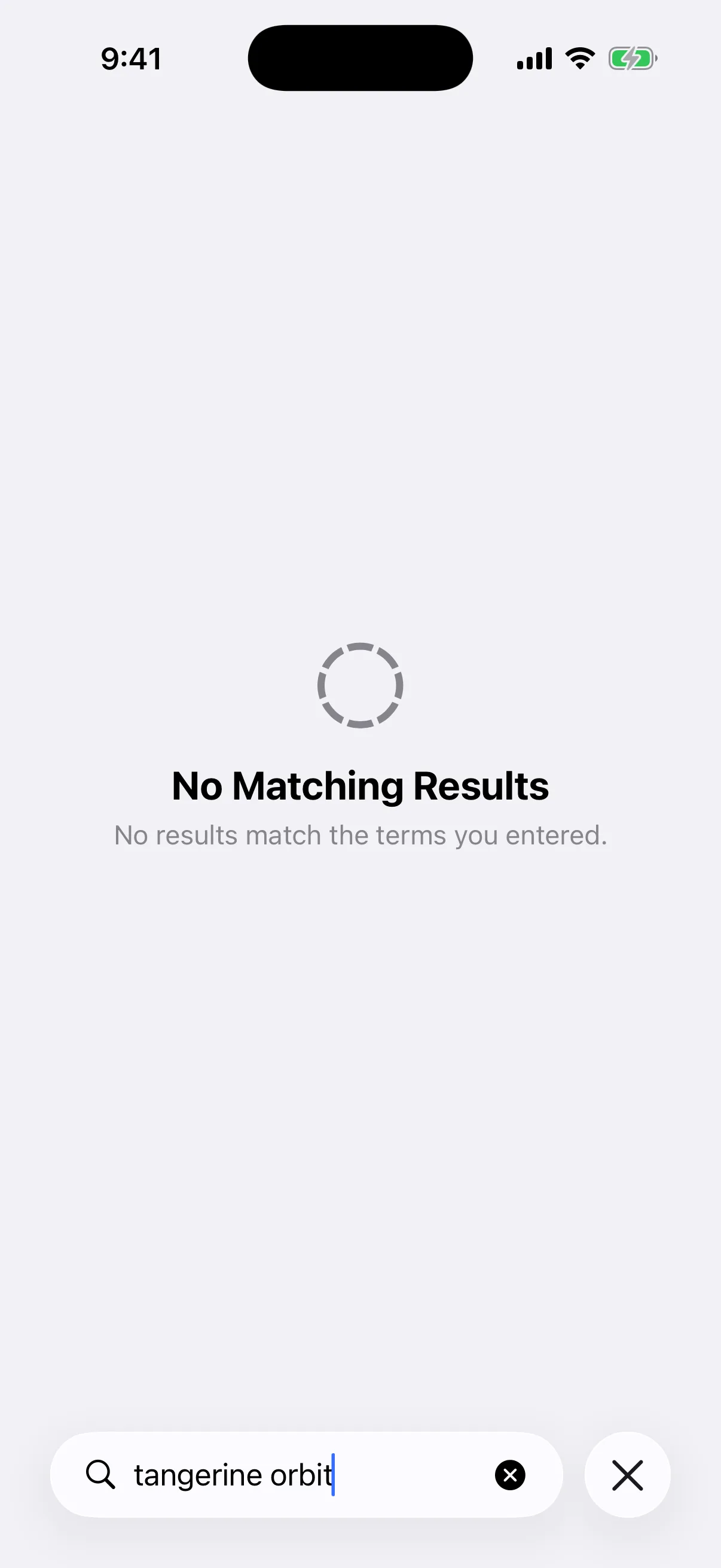
Real Simulator output for the unmatched query “tangerine orbit.” Aperture returns “No Matching Results” because neither term belongs to the local wallet index.
Try a shorter prefix, remove an over-specific term, qualify an asset with its network, or paste the exact public address, contract, or transaction hash. If the item is blockchain activity, confirm that it belongs to the currently selected wallet and has already been synchronized into its eligible history.
What Universal Search does not do
It is not a blockchain explorer. It searches locally known wallet content, not every transaction, address, or token on the internet.
It is not fuzzy semantic AI. Exact, prefix, normalized-term, alias, identity, and numeric matching are predictable; arbitrary misspellings are not promised.
It does not cross selected-wallet activity boundaries. Wallet management can find another wallet, but transaction history remains scoped to the wallet currently active when the query runs.
It does not expose secrets. Recovery phrases and private keys never enter the search documents or WalletDatabase.
It does not mutate a result merely by finding it. A hidden asset stays hidden, a setting stays unchanged, and a different wallet stays inactive until you select the corresponding row.
Queries worth remembering
An action: Send, Receive, Scan QR, Assets, Manage Assets, or Transaction History.
A setting: Face ID, Auto Lock, Privacy, Language, Currency, Notifications, Terms, or Reset.
An asset identity: Bitcoin, USDT Ethereum, a token contract address, or a native symbol plus its network.
A network: Bitcoin Cash, Base, Polygon, Solana, or another supported mainnet alias.
A wallet: Its nickname, public address, or wallet kind.
An activity clue: A transaction hash, counterparty address, asset, decoded method, status, direction, or memorable local note.
Questions before you rely on Search
Does Aperture upload my query? No Universal Search request is sent to a remote search endpoint. Matching runs against the in-memory index and the on-device WalletDatabase. Normal wallet synchronization is separate.
Why did an asset appear even though it is hidden on Home? Search and Home visibility answer different questions. Finding the asset does not change its visibility preference.
Why does one word appear in several sections? The same term can name a setting, network, wallet, or asset. Grouped domains preserve context instead of arbitrarily discarding valid matches.
Can I search another wallet’s transactions? Make that wallet active first. Managed-wallet results span available wallets, while activity lookup is intentionally scoped to enabled accounts in the selected wallet.
Can I find a transaction by my note? Yes. Local transaction notes update the FTS search document. Raw calldata remains excluded.
Why is a newly seen transaction missing? Universal Search can only retrieve eligible activity already synchronized into WalletDatabase. Let wallet synchronization complete, verify the active wallet and network, then search again.
The shortest path starts with the word you already know
Universal Search makes a large self-custody wallet feel smaller without hiding its structure. Networks remain networks. Assets remain identity-qualified assets. Wallets remain separate ownership scopes. Transactions remain selected-wallet records. Settings keep their own screens. Search simply builds one local, ranked map across them.
That map is fast because it is bounded, private because the query stays local, useful because results are real destinations, and honest because an unmatched query stays unmatched. When the wallet grows beyond what you can keep in your head, the path forward is still one field away.
Search by intent. Confirm the category. Open the real destination.